跨境独立站开店
Tools and apps
How to integrate your Shopify store with Shopify POS from scratch
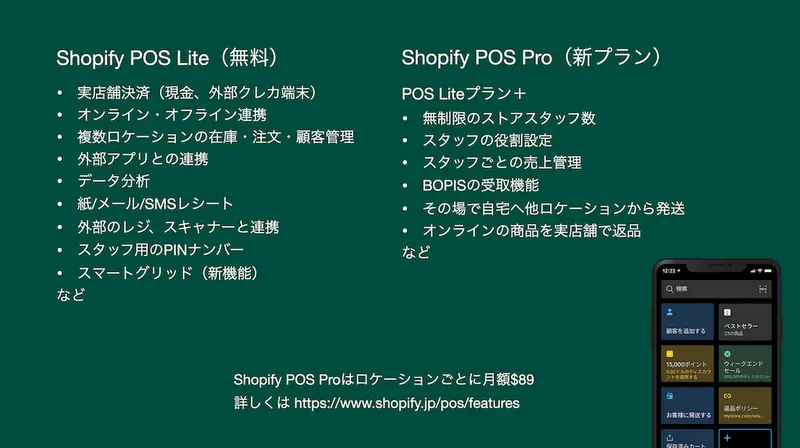
I want to use Shopify POS to synchronize and integrate data between my physical store and online store! But I don't know how to do it...
This guide will show you how to set up multi-currency apps for Shopify. Introduce multi-currency sales, essential for cross-border e-commerce, to your online store and aim to increase your sales.
Here are some recommended sales tools. Let's use SFA (Sales Force Automation) apps, which are useful for e-commerce sites and online businesses, to drive efficient sales activities.
This article introduces sales management and marketing apps that can help increase your store's sales. Some apps are suitable for both online shops and physical retail stores, so please take advantage of them.
"The inventory in our physical stores' POS systems and our e-commerce site are not synchronized, resulting in frequent overselling." "Customer information is scattered between online and offline channels. We are unable to provide consistent service even to our best customers."
This article provides a clear and concise explanation of POS software, from its basic functions to its advantages and disadvantages. While POS software is often perceived as expensive to implement, it's actually possible to get it for free. We hope this Shopify article will be helpful in your POS implementation.
This article introduces recommended project management tools and their main roles and functions. Check out features that improve work efficiency and reduce errors, as well as pricing, to help you manage your projects smoothly.
Compare print-on-demand services to find the one that's right for you. The best option will vary depending on the type of product you need, your budget, and your location.
With Shopify and Printful's online store integration, you can design and sell original goods using on-demand printing and dropshipping. This guide will show you how to set up your Shopify store to sell original goods using Printful.
With the consumption tax increase starting October 1st, some businesses may be changing their product prices. Therefore, Shopify, in collaboration with Shopify partner Byward Labs, has released a Japanese-language app for bulk price changes.
This document summarizes what financial cash flow is. It explains in detail the factors that cause financial cash flow to be positive or negative, and what it means for financial cash flow to be negative.
POS integration can streamline shop operations, reduce errors, and increase sales. Find the perfect POS integration for your business.
This article introduces the uses of pipeline management tools and recommends some tools. Use them to manage leads, visualize sales processes, and automate tasks.
By leveraging Pinterest marketing, you can help users naturally discover your products through image search and recommendation features.
This article introduces recommended image editing software, along with how to choose the right software for your needs. We cover a wide range of options, from software that allows even beginners to edit photos like a pro, to free online software.
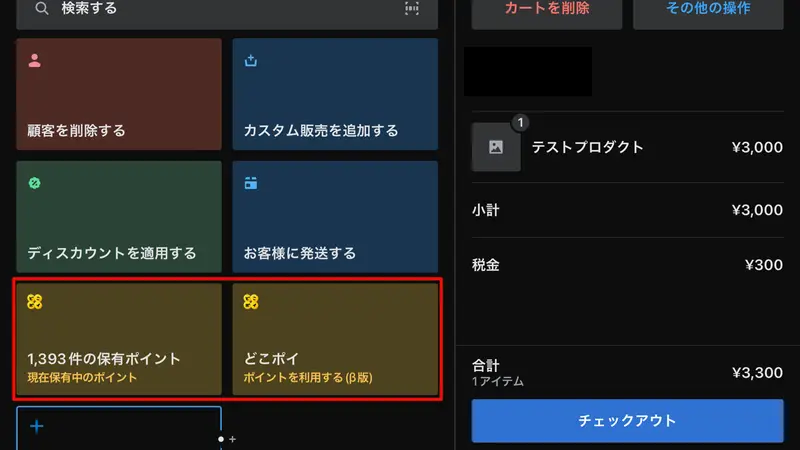
This article introduces "common points between e-commerce and physical stores," a common use case for many brands and stores that leverages Shopify POS for seamless integration, and "Dokopoi," an augmented points app that makes this possible.
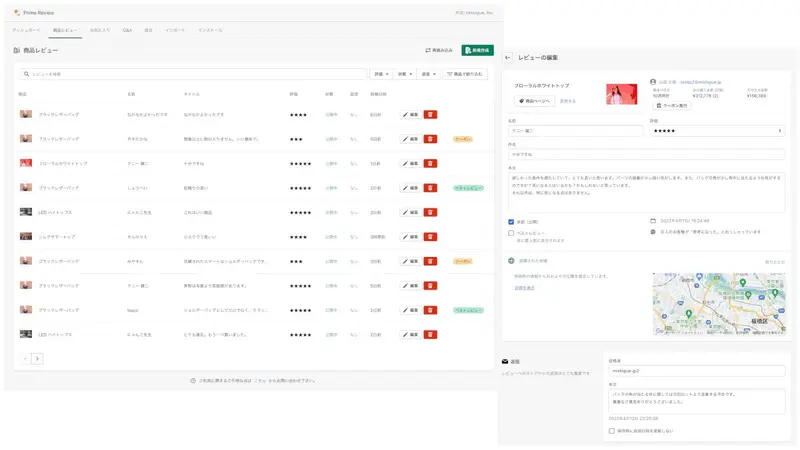
Introducing Prime Review, an all-in-one Shopify app for product reviews, favorites, and Q&A. Prime Review offers a Japanese UI and support, and its product review function, which is compatible with the new Shopify theme mechanism and OS 2.0, can be easily installed with a single click, providing excellent customization options.
I'd like to introduce "Quick Order Printer," an app that allows you to easily print invoices compliant with the invoice system for online shops built with Shopify.
At Shopify, we continuously improve our platform to support merchants' new business models and strive to provide a cutting-edge e-commerce experience.
Merchants need the power to have complete control over the feel of their website. They need to deliver a unique user experience across all channels, while maintaining a design that reflects their brand, and being able to tailor it to their customer base. This need for growing businesses to deliver fully customized, dynamic, and creative purchasing experiences across multiple channels demands a lot from developers who need to implement that flexibility.
Shopify is introducing custom apps to ensure the security of all public apps going forward. This announcement will not affect existing apps.
Among the various Shopify apps that can provide merchants with a range of functions, embedded apps that can be placed in the admin panel are highly valued for providing merchants with a powerful user experience (UX).
Shopify apps and themes allow you to incorporate various unique features and designs into your Shopify platform. This article summarizes the basic information and useful tips needed for developing such Shopify apps and themes.
Embedded apps are an essential part of the Shopify ecosystem, allowing merchants to add functionality to their stores without leaving the familiar Shopify Admin.