跨境独立站开店
Barcode Inventory Management: System and App
Barcode-based inventory management systems are a powerful tool for retail businesses. Eliminate errors, save time, and increase customer satisfaction.

Barcode-based inventory management systems are a powerful tool for retail businesses. Eliminate errors, save time, and increase customer satisfaction.
Imagine the end of the day at a store. After the last customer leaves, you feel a sense of relief, but at the same time, you realize you still have one last task left: checking the inventory.
Starting from one end of the store, each item is counted by hand, and the quantity is recorded on a sheet. In the dim lighting, eyes are strained to ensure nothing is overlooked. This is a monotonous and time-consuming task. Sometimes, the counting is repeated multiple times to ensure accuracy.
Implementing a barcode inventory management system can completely change this situation. Let's resolve these problems right away. This article will explain in detail the mechanism of barcode inventory management, recommended barcode software, and how to implement it.
What is barcode inventory management?
Barcode inventory management is a method of tracking store merchandise using barcodes and scanners. Barcodes consist of a pattern of black lines and blank spaces, and when scanned, they display important information such as product name, price, and quantity.
This system allows you to manage your inventory while keeping track of current stock levels, best-selling items, and items that need additional ordering.
A barcode inventory system automates product tracking from the moment an item arrives in a store until it is sold. It provides accurate, real-time insights into inventory, supporting smarter decision-making and contributing to improved customer satisfaction.
Barcode Inventory Management System Mechanism
Retailers can streamline product tracking and management by implementing barcode inventory management systems.
The mechanism is as follows:
- Barcode Assignment: The system assigns a unique barcode to each item in inventory. This barcode contains detailed information such as the SKU (stock keeping unit), price, and product description.
- Point-of-sale scanning: When a customer purchases an item, the cashier scans the barcode at checkout. This action automatically deducts the corresponding item from the system's inventory count, updating the inventory level in real time.
- Incoming Stock and Inventory Updates: When receiving new stock, scan the barcode of the incoming items. The system updates the inventory quantity, ensuring the accuracy and up-to-dateness of the records.
- Inventory Monitoring and Reordering: You can now continuously monitor inventory levels. When the quantity of an item falls below a pre-set threshold, an alert is triggered, prompting you to reorder. This helps prevent popular items from running out of stock.
- Data Analysis and Reporting: In addition to inventory tracking, you can also analyze sales trends and generate reports. This data helps you decide which products to increase and which to phase out.
Benefits of a barcode inventory system
Whether you're running a global e-commerce store or a small retail shop, implementing a barcode inventory system offers several significant advantages.
Business efficiency
Implementing barcode inventory management can improve both the checkout and replenishment processes. Scanning barcodes is faster and more accurate than manual data entry, leading to shorter transaction times and reduced waiting times.
Furthermore, barcodes streamline internal inventory management processes and enable the scaling up of operations.
According to Yann Max, a partner at Momo Lifestyle (English website), barcodes can function as a common language between retailers and logistics companies when working with 3PLs.
"We can't expect 3PLs to understand our various products and their specifications at the same level as we do. That's why barcodes are useful for product identification," he explains.
"A key point in promoting operational scalability is using separate barcodes for individual product packaging and outer cartons. This allows 3PLs to send full cartons of products to B2B customers' warehouses and individual products directly to end consumers."
Improving the accuracy of inventory management
Scanning barcodes displays detailed product information, significantly reducing human error in inventory tracking. This improved accuracy ensures consistently reliable inventory levels, minimizing the risk of excess inventory and stockouts.
Supporting better decision-making
The system provides valuable data on sales trends and inventory movements. Retailers can use this information to make informed decisions about product ordering, pricing strategies, and promotions.
Disadvantages of barcode inventory systems
No matter which inventory management system you choose, there will always be some drawbacks. Before implementation, consider the main disadvantages of using barcodes.
Initial cost
Implementing a barcode inventory management system requires an initial investment in hardware, software, and infrastructure. Retailers need to consider the cost-effectiveness and ensure that the investment is appropriate for their business scale and budget.
Training hours
The team will need to learn how to use the new system. This will take time, and work may be slow at first. However, once everyone is proficient, it will be able to operate smoothly.
technical issues
Occasionally, technical issues can occur. For example, a scanner might fail to read a barcode, or a software glitch might appear. Having excellent technical support to quickly resolve these problems is crucial.
Inventory management methods using barcodes
Are you ready to organize your inventory using barcodes?
Here's how to get started:
1. Generate barcodes for the system
Start by creating a unique barcode for each item in your inventory. You can use online barcode generation tools or dedicated software. Ensure that each barcode corresponds to specific product information.
💡 Tip: Shopify's free online barcode generator is a fast and easy-to-use tool. You can generate new barcodes in seconds and download or print them.
2. Attach labels to the inventory.
Once you've created the bar, print it and attach it to the product. Make sure the label is securely attached and easy to scan. This step is essential for accurate tracking and quick product identification.
3. Preparing the inventory scanner
Invest in a reliable inventory scanner that can read barcodes. Mobile apps and handheld scanners are popular due to their portability and ease of use. This tool is essential for fast and efficient inventory management.
💡 Tip: The Shopify mobile app makes scanning inventory quick and easy. You can assign barcodes to existing products in your online store and even increase product inventory quantities within the app.
4. Selection of Inventory Software
Choose inventory management software that can integrate with a barcode system. The software should enable inventory level tracking, sales monitoring, and report generation. Find a user-friendly platform that suits your business needs.
5. System training for employees
Finally, train employees on how to use the barcode system and inventory software. Ensure they understand how to scan products, update inventory, and troubleshoot problems. Proper training will ensure a smooth transition and efficient continued operation.
Barcode Inventory Management App
To help you choose the right barcode software for your business, here are three easy-to-use apps.
1. Quick Scan - Barcode Scanner
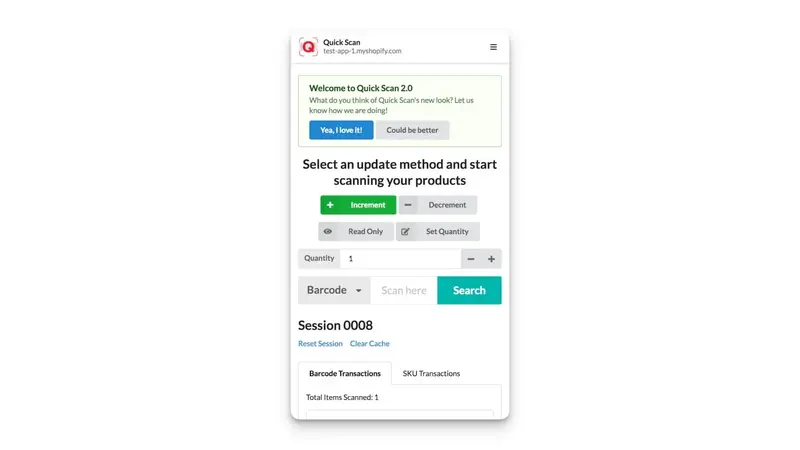
Quick Scan (not available in Japanese) is an easy-to-use barcode scanner app featuring a simple setup. This app allows you to quickly scan and decode barcodes, making it an ideal tool for retailers new to barcode scanning.
Furthermore, it's easy to add or remove inventory quantities within stores, as well as move inventory between locations.
Main features:
- Inventory level tracking, product organization, and real-time inventory information updates.
- Export scan data to a CSV file
- It displays a history record of all scanned items, enabling easy reference and tracking.
- Inventory transfer between stores and warehouse locations
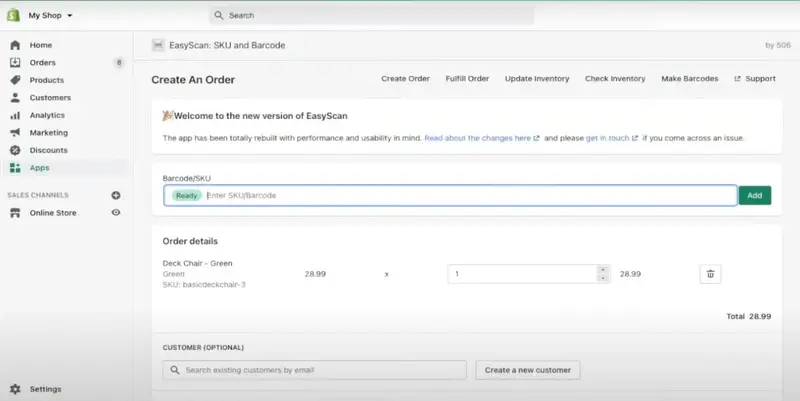
2. EasyScan: SKU & Barcode
The biggest feature of EasyScan (not available in Japanese) is its compatibility with all scanners. In addition to generating printable barcodes, it can also be used to create SKUs.
- Life with custom barcode labels
- Display of the exact product storage location
- Real-time monitoring of inventory levels
- Access detailed product information including description, price, and stock level.
- Export scan data and inventory reports to CSV or Excel files.
3. iPacky
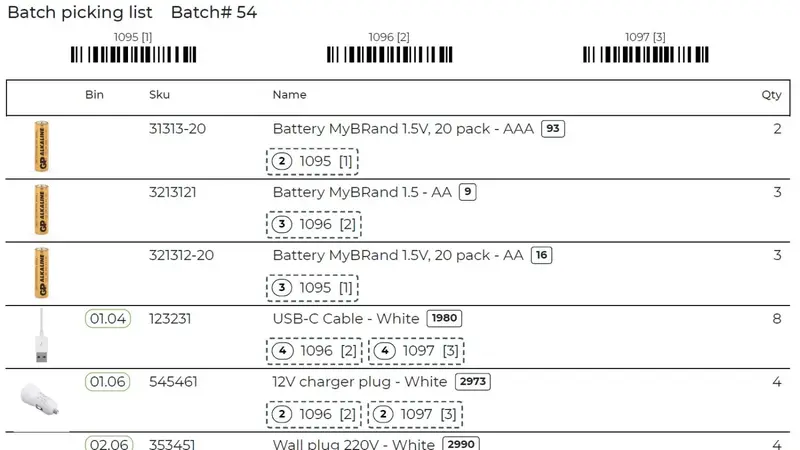
iPacky (not available in Japanese) is a Shopify app designed to streamline the order fulfillment process. It provides barcode scanning, batch picking, and packing tools to help retailers reduce errors and improve efficiency in packing and shipping operations.
- Supports batch picking and printing of picking lists or packing slips.
- Providing storage space
- Sharing optimized picking routes for faster and more organized picking.
- Bundle support ensures that all items in the kit or bundle are correctly picked and packed.
- Customizing workflow requirements
- Providing multi-user access
Let's utilize barcode inventory management in stores.
Using barcodes is a simple way to streamline inventory management. Instead of guessing whether each location has enough stock, you can quickly scan barcodes to check accurate stock levels and storage locations.
Whether you're a newly opened store or running a thriving online shop, barcode inventory management saves time and supports business expansion.
Manage inventory from the back office.
Shopify POS comes with tools to manage warehouse and store inventory in one place. You can forecast demand, set low inventory alerts, create purchase orders, identify best-selling and slow-moving items, and count inventory.
FAQ regarding barcode inventory management
How can I create inventory barcodes for free?
Creating free inventory barcodes is easy. Follow these steps:
- Selecting a barcode generation tool: Choose a free online barcode generation app.
- Entering product details: Add information you want to include in the barcode, such as product name and price.
- Generate and Download: Click to create a barcode and download it for printing or digital use.
What is the difference between an SKU and a barcode?
Both SKUs (stock keeping units) and barcodes are used for product tracking, but their purposes are different.
- SKU: A unique code created by retailers to identify and track specific products. SKUs are used internally in inventory management to distinguish products based on characteristics such as size, color, and style.
- Barcode: A visual, machine-readable code for data. Barcodes are standardized for global use and can be scanned to quickly retrieve product information.
SKUs are for internal product tracking, and barcodes are for general scanning and identification.
Are there any free apps for scanning barcodes for inventory?
The Shopify App Store has several apps that can help with barcode scanning for inventory management.
- iPacky: Designed for order fulfillment and inventory management, iPacky is compatible with all scanners. It supports barcode and SKU generation, barcode label printing, and multi-order pick lists. It enables quick inventory checks and updates with built-in storage.
How do I set up a barcode inventory system on Shopify?
To set up a barcode inventory system in Shopify, follow these steps:
- Barcode Generation: Use a barcode generation tool to create barcodes for each product. Shopify's Retail Barcode Labels app helps you generate and print barcode labels.
- Assigning barcodes to products: Navigate to the product details page in your Shopify admin panel and assign the generated barcodes to the corresponding products.
- Barcode scanning hardware settings: Choose between a handheld barcode scanner or a mobile barcode scanning app. Handheld scanners can be wired or wireless, while mobile apps can scan using the device's camera.
- Barcode scanning and inventory management integration: Scan products using the Shopify mobile app or a compatible barcode scanner and update inventory levels in real time.
- Staff training: Ensure the team is familiar with the barcode scanning process and inventory management system.
- System Testing: Before fully implementing the barcode inventory system, we thoroughly test it to ensure it works as expected.
Share this article
- Share on Facebook
- Share on X
- Share on LinkedIn