跨境独立站开店
2022 update archive | Tools and apps | Shopify API Release: January Edition
Summary of API features for January 2022. This version includes improved product filtering via the Storefront API, a revamped Product Taxonomy API, definitions of new metafields for collections, customers, and orders, the Order Invoice API, new error codes for Bulk Mutations, and a simplified method for retrieving translatable resources, feature images, and barcodes.
Attention developers! Here's a summary of the API features updated for January 2022. This version includes improved product filtering via the Storefront API, a revamped Product Taxonomy API, definitions of new metafields for collections, customers, and orders, the Order Invoice API, new error codes for Bulk Mutations, and a simplified method for retrieving translatable resources, feature images, and barcodes.
This article is about the January 2022 release of the Shopify API. We'll provide information to help you improve the quality of your apps and streamline your development experience by leveraging the latest features.
This version includes improved product filtering via the Storefront API, a revamped Product Taxonomy API, definitions of new metafields for collections, customers, and orders, the Order Invoice API, new error codes for BulkMutations, and a simplified way to retrieve translatable resources, feature images, and barcodes.
Additionally, this release will remove version 2021-01, so please check your API health report to review future changes and ensure compatibility. A complete list of all API changes related to this version can be found in the 2022-01 release notes (in English).
1. Filtering products within a collection using the Storefront API
Starting with the 2022-01 version, you can now filter products within a collection, allowing you to narrow down the search results displayed to your customers. After retrieving products belonging to a collection, you can filter them by criteria such as vendor, product type, variation options, and availability.
These filters can also be combined, allowing you to retrieve items from your collection based on more complex characteristics.
For example, the following query shows how to retrieve products that have all of the following attributes:
- Type: Shirts & Tops
- Vendor: Bestshop
- Color: Very Peri
Here are the variables.
Filtering items within a collection is a great way to show customers the most relevant products. For more information on filtering collection items using the Storefront API, please see this documentation (in English).
2 Product Taxonomy API
If you want to organize the products on your merchant storefront so that customers can easily find them, we recommend using the new Product Taxonomy API. StandardizedProductType is a predefined product category that improves the searchability of products on your storefront. It also makes it easier for merchants to list products on channels like Facebook that require conformance to standard set types.
If you have a product type that doesn't fit into a predefined category, you can use the `customProductType` field on the product object. Like the traditional `type` field, this is a string. This custom product type can also be used with the parent's `StandardizedProductType`, provided the parent category matches the product.
The following query is an example of retrieving an arbitrary StandardizedProductType.
Here is the response.
For more detailed information about product taxonomy, please refer to the developer documentation.
3. Defining Metafields in Collections, Customers, and Orders
The July 2021 version released a metafield update that enables custom metafield types for products. This version expands support for this feature to Collections, Customers, and Orders. Metafields in these new resources also validate 18 different data types, allowing you to store valid data for display in your app and storefront.
The following example shows a request to create a definition for a customer metafield that stores product references.
It's a variable.
For more details on the definition of metafields and the migration to the improved type system, please refer to the developer documentation (in English).
4. Order Invoice API
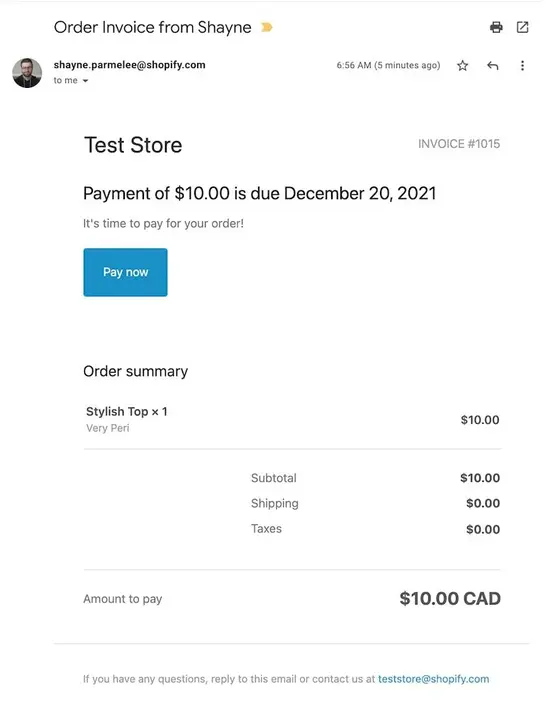
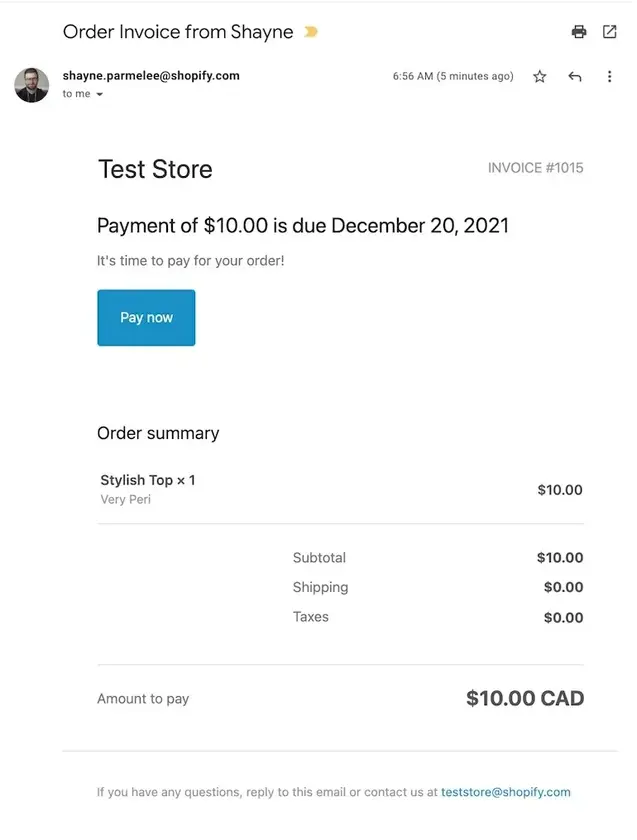
A new mutation has been added to the app that allows you to send invoices for orders using the Shopify API. The orderInvoiceSend mutation provides the order ID and email content, allowing you to send emails directly to customers requesting payment for orders that require payment. This was previously a manual process for merchants, but it can now be automated.
Here is an example of a mutation that sends an invoice to a customer.
Here are some examples of variables.
The following email will be sent to you as a result of this request.
This email contains a direct link to checkout, allowing you to easily complete the payment for your order.
For details on sending invoices using the orderInvoiceSend mutation, please refer to the documentation (in English).
5. Error Codes for the Bulk Mutation API
Until now, BulkMutations only displayed one error code: "BULKMUTATIONUSERERRORCODE". Starting with this version, instead of this generic error code, five new, more detailed error codes are provided that will help you quickly understand what's wrong.
A complete list of these new error codes can be found in the developer documentation (in English).
As a reminder, for situations requiring continuous API requests lasting more than 10 seconds, the BulkMutation API is the fastest and most efficient way to sync data to Shopify. For more information on how to sync data to Shopify using the BulkMutation API, please see the documentation (in English).
6. How to retrieve multiple translatable resources by ID
Previously, retrieving a set of translatable resources associated with a specific ID required making multiple requests to obtain one resource at a time. Starting with version 2022-01, it's now possible to retrieve a specified set of translatable resources using an array of IDs. This eliminates the need to retrieve all resources of a specific type or make individual requests for each ID.
The following examples show two variations: a request to retrieve translatable resources for a specific product, and a single request.
You can find more detailed information about the translatableResourcesByIds query in this document (in English).
7. New Storefront API Product Fields
Starting with version 2022-01, the Storefront API will support two new product fields: the featuredImage field for quickly and efficiently retrieving a feature image for any product, and the ProductVariant barcode field for retrieving a variation's barcode.
Here is an example query to get both of these new fields.
Here is the response:
Let's check the latest changes.
Original text by Shayne Parmelee, translated by Nozomi Fukatsu
Share this article
- Share on Facebook
- Share on X
- Share on LinkedIn