跨境独立站开店
Six Shopify Flow Workflows for Orders, Inventory and Customer Follow-Up
Use an observable event, a clear condition and a named owner for each automation. These six workflows cover everyday decisions that a store team can test before launch.
Write down the triggering event, condition, and action.
For example, "A certain variant's available stock has decreased" is an event, "Belongs to the main series and is below its restock point" is a condition, and "Send a reminder to the purchasing department containing the SKU and location" is an action. First, confirm the available triggers, actions, and connected applications in your store's Flow. Record all rule owners and deactivation methods to avoid multiple processes modifying the same tag simultaneously.
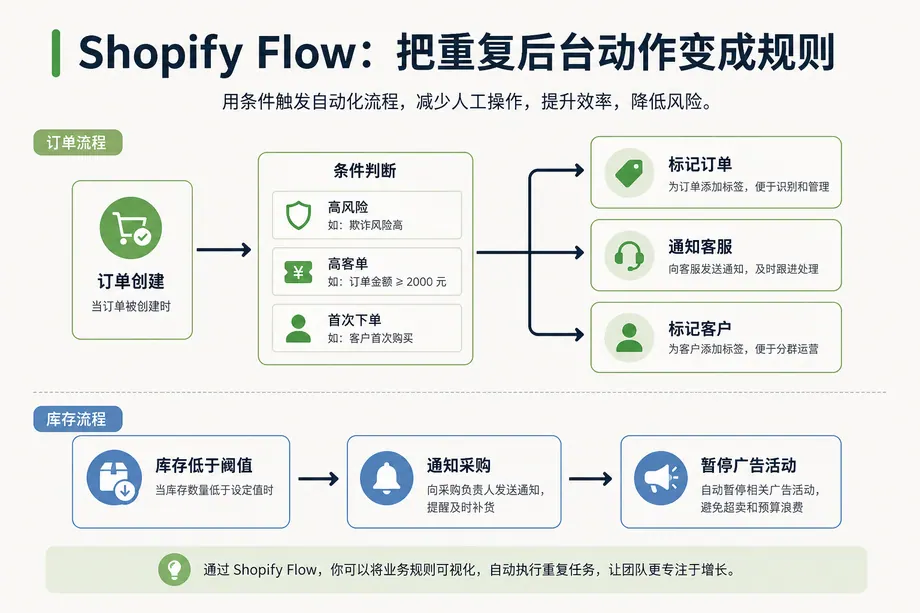
1. Send the order for manual review.
For events where risk analysis is already in place, determine the risk level, or set a threshold for large orders requiring verification based on the store's historical data. If a risk is detected, add a pending review tag and notify the responsible person; separately verify whether the automated fulfillment process excludes these orders. The tag itself does not suspend your warehouse operations. Manually check payment and availability information before deciding on the next step, and keep a record of the assessment.
2. Submit low inventory alerts to purchasing.
Set thresholds and corresponding warehouse locations for target variants, and send notifications including SKU, location, current available stock, and replenishment manager. An SKU may trigger multiple times below the threshold; design a mechanism to detect when it falls from above the threshold to below, or record the notification status. Clear the flag after receiving stock, and a new notification will only be sent in the next replenishment round.
3. Use customer tags to group repeat purchases.
Differentiate between first-time purchases, repeat purchases, and category-specific preferences. Define which type of valid order to use and how to correct for cancellations and refunds. Existing tags should produce the same results when re-executing. When planning to use tags in emails, separately verify marketing subscription licenses; purchase history and subscription intent are two separate pieces of information.
4. Send the return/exchange signal back to the product team.
When a refund or return occurs, record the order line, product variation, reason, and time. Do not interpret every refund as a product quality issue; size, delay, and shipping damage should be handled separately. Summarize by SKU and notify the corresponding product manager. Regularly check whether revisions to size charts, packaging, or product descriptions are necessary.
5. Retain the order context for customer service.
Record any special packaging requirements, pre-sales, or distributed warehousing needs in a standardized internal label or note. Check where these fields appear on test orders, whether customers will see them, and whether manual notes will be overwritten. Long texts, contact information, and irrelevant personal data should not be included in the automatic labels.
6. Follow up on purchase intentions after the event.
Identify interested visitors using recorded subscriptions, event registrations, or authorized interactions, then exclude those who have already purchased or unsubscribed. Do not schedule personal marketing contacts if the source does not provide identification or consent records. Set event end dates, follow-up periods, and opt-out conditions to prevent expired workflows from continuing to be sent.
Four checks before going live
- Prepare one example of a hit, one example of a miss, and one example of a boundary value; have the person in charge verify the objective of each action.
- Use test orders or authorized samples to view execution records and verify the actual content and recipient of the notification.
- Verify that duplicate events will not be sent repeatedly or have notes added repeatedly, and confirm who is responsible for following up when the service is temporarily unavailable.
- Enable on a small scale and observe workflow records and manual processing volume. Rule versions, modifiers, and disabling entry points should be written into the team's operation manual.