跨境独立站开店
2021 update archive | Shopify API: January Release Information
Welcome to the January 2021 API Features Roundup. This is designed to help you understand how to incorporate all the latest changes to improve your app's quality and streamline your development experience.

Welcome to the January 2021 API Features Roundup. This is designed to help you understand how to incorporate all the latest changes to improve your app's quality and streamline your development experience.
Welcome to the January 2021 API Features Roundup. This is intended to help you understand how to adopt all the latest changes to improve your app's quality and streamline your development experience. This version releases native support for subscriptions with the new Subscription API, one of the most requested features to date. This includes scheduled fulfillment to facilitate prepaid subscriptions, automatic activation of app fees, and more detailed financial information regarding orders and transactions, such as total fees and tips. The 2021-01 release coincides with the removal of version 2020-01, so please ensure compatibility and remember to check your API Health Report to see the changes. This article will introduce the features included in the 2021-01 release.
1. Subscription API
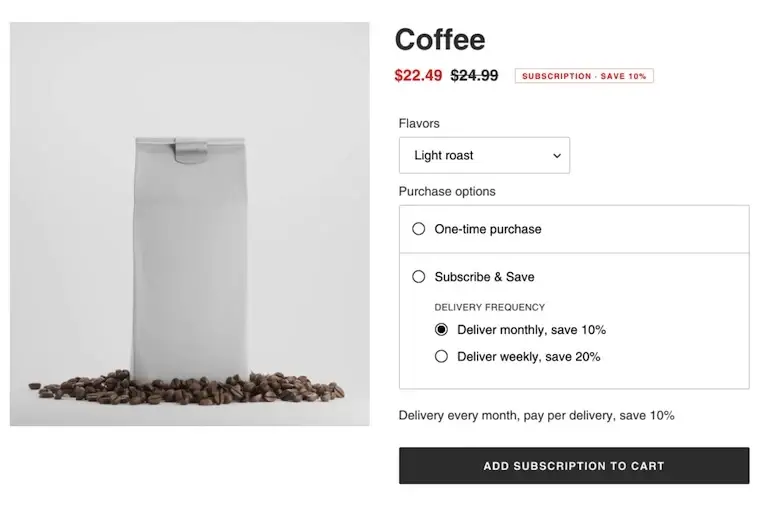
Subscription agreements, subscription invoices, and customer payment methods all receive their own webhook topics, allowing you to stay up-to-date on common subscription events.
Product Subscription App Extension
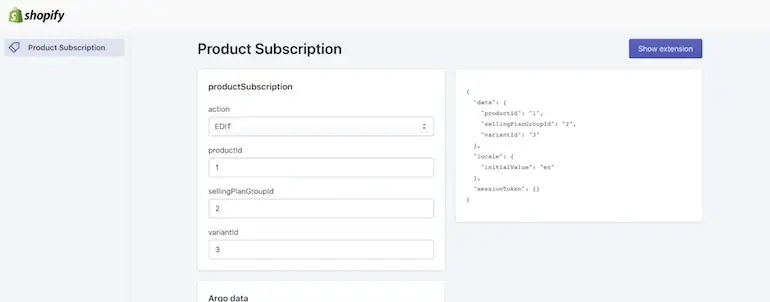
To enhance the native tools at the heart of the new subscription experience, we've released a new type of App extension that allows app developers to streamline subscription management directly from the Shopify admin. This new type of App extension can be created with a single command from the Shopify App CLI and includes all the necessary foundation to deliver a great merchant experience.
Additionally, the Shopify App CLI comes fully equipped with a simulator for product subscription app extensions, allowing you to preview changes to your scaffolded app extension code in real time.
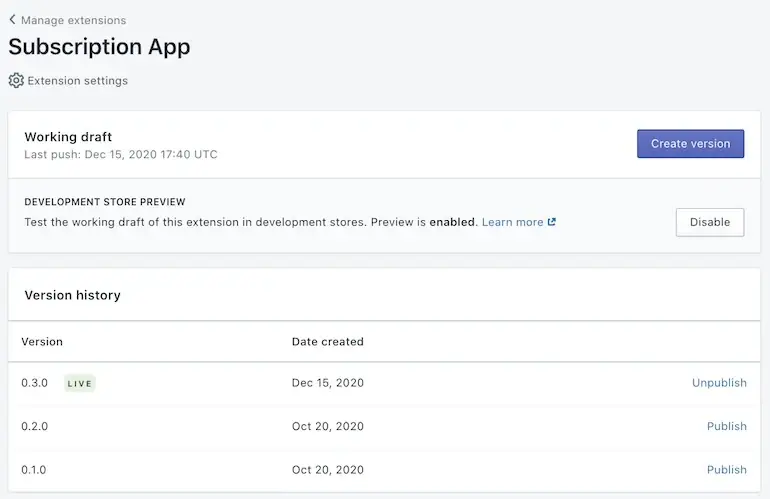
Once you're ready to deploy your app extension, you can push it to your partner dashboard (partner management screen), where you have complete control over the version history, and then publish the app extension to all the shops that have installed your app with just a click of a button.
Shops with the subscription app installed render subscription cards on product pages in their Shopify admin and pass that data to a modal powered by the publicly available App extension code. Because this entire exchange takes place between code hosted on Shopify, product subscription App extensions are incredibly fast.
For instructions on developing a product subscription app extension, please refer to this tutorial.
3. Scheduled Fulfillment
The final subscription-based change in this version is scheduled (reserved) fulfillment. Fulfillment orders now support a SCHEDULED status and will appear on all orders, including prepaid subscriptions. These fulfillment orders include a fulfillAt date and will transition to an OPEN status once a SCHEDULED fulfillment order expires.
As of January 2021, API clients can also reschedule fulfillment orders to a later date by specifying a future date for the fulfillment order using the new fulfillmentOrderReschedule conversion. Rescheduling fulfillment orders is particularly useful for prepaid subscriptions. This feature is not yet available from the Shopify admin UI.
4. Automatic activation of in-app purchases
In previous versions, billing for apps using the REST API was a three-step process.
- Step 1: Create billing for the application.
- Step 2: The merchant accepts or rejects the fee.
- Step 3: If the invoice is approved, make an API call to activate the pending Accept charge.
As of January 2021, apps do not need to perform this third step. Approved app charges automatically transition to an "active" state, eliminating the possibility of charges being created by the app, approved by the merchant, but subsequently not activated and paid to the partner.
5. Improving financial reporting
Version 2021-01 includes two changes to improve the accuracy of the accounting app. First, there is a new object called TransactionFee, which is available as part of the Admin GraphQL API. This new object contains more detailed information about the fees collected as part of Shopify Payments, including flat rates, percentage rates, and a breakdown of taxes on those fees. Second, the GraphQL Admin API now includes the totalTipReceivedSet field in the order object to include tips received as part of an order in both shop currency and payment currency. This increased granularity allows the accounting app to report fees and tips for specific order transactions more accurately.
read more
- Create fast and functional apps using Shopify App Bridge
- Online school "Daytra" has launched a "Shopify Course." The course covers not only the specific usage of Shopify, but also sales and advertising management.
- The future of cross-border e-commerce experts
- Announcement of the launch of the "WACA Shopify Online Course"
- Master the three essential tools for Shopify embedded apps: Polaris, App Bridge, and App extensions!
- Anyone can "turn their ideas into reality." Learn how to use Shopify with "puzzlly," a video learning service specializing in No-Code.
- Summary of the Shopify Partner Town Hall held in October
- Shopify API Versions and Deprecation Information
- What is CSS? A beginner's guide to CSS
Grow your business with the Shopify Partner Program. Whether you offer marketing, customization, web design, or development services, the Shopify Partner Program will guide you to success. Joining the program is free, offers revenue-sharing opportunities, and provides access to a wealth of tools to grow your business. Join our passionate commerce community today!
Share this article
- Share on Facebook
- Share on X
- Share on LinkedIn