跨境独立站开店
Shopify SEO Strategies: Methods and Apps
This article introduces SEO strategies you can implement with Shopify. It also covers useful Shopify SEO apps and free strategies you can implement right now.







This article introduces how to implement SEO strategies for your Shopify e-commerce site and recommends some useful apps.
There are several ways to increase traffic to your online shop, and one of them is to implement SEO measures. However, with so much information and so many tools available for e-commerce SEO, many people don't know what to do or which ones to choose.
Therefore, this article summarizes basic SEO measures that can be taken with the e-commerce platform Shopify, as well as recommended Shopify apps for SEO.
For more detailed information on SEO strategies for your entire e-commerce site, please also refer to our "E-commerce Site SEO Guide."
The Complete Guide to E-commerce Site SEO | Practical Strategies for Technical Analysis, Content, and Internal Linking
What is SEO?
SEO stands for Search Engine Optimization, and it refers to efforts to improve a website's ranking in search engine results.
When people search on Google or Yahoo! JAPAN, most click on the sites that appear at the top of the search results. Therefore, SEO is essential for creating and operating a website or online shop to acquire customers.
Furthermore, since SEO does not require advertising expenses, it also leads to a reduction in customer acquisition costs (CAC).
For customer acquisition strategies other than SEO, please refer to the "EC Site Marketing Guide" for more detailed information.
The Complete Guide to E-commerce Marketing | A Thorough Explanation of Strategic Frameworks and Execution Funnels
15 SEO Tips for Shopify Stores
- Purchase a custom domain
- Identify the appropriate keywords
- Incorporate keywords into URLs and slugs.
- Set title tags
- Set a meta description
- Include important keywords in the header (h1).
- Organize internal links
- Add alt tags to all images.
- Use a responsive design theme.
- Increase content
- Image display speed optimization
- Set up Google Analytics
- Set up Google Installation Console
- Submit your sitemap to Google Search Console
- Acquire backlinks
1. Purchase a custom domain.
Websites using a custom domain tend to gain more user trust and receive higher rankings from search engines, so you should switch to a domain that is more suitable for SEO.
Shopify allows you to open a store using the free domain "myshopify.com," but you can also purchase your own domain.
Normally, acquiring a custom domain requires a separate contract with a domain registration service, but with Shopify, you can purchase a domain with just a Shopify account, eliminating the need for contracts with other services.
You can also connect to existing external domains.
You can purchase a custom domain by going to the settings icon in the admin panel > "Domains" > "Purchase a new domain," checking the available domain extensions and prices for the domain name you want to buy, and then purchasing it. After purchase, you can manage it from the Shopify store admin panel.
2. Identify appropriate keywords.
To be ranked highly by search engines, it's crucial to find keywords that potential customers are likely to use. Here's how to find them:
- Investigating the keywords driving traffic to competitor websites: We use keyword analysis tools like Rakko Keyword to check the keywords driving traffic to competitor websites and the estimated number of visits for each keyword, which helps us in selecting our own keywords.
- Utilizing Google Trends: Extract currently trending words and keywords that were popular during a specified period.
- Viewing "People also search for": When you search on Google, you can find clues to popular keywords from the related words displayed at the bottom of the search results page.
- Checking "Related Questions": When you search on Google, the search terms and answers of other users related to your search keyword are displayed. This allows you to understand what users are interested in and use it as a reference for selecting keywords.
Once you've identified a few keywords, use the following tools to check the search volume to determine if there's demand for them.
- Keyword Tool
- Otter Keyword
- Google Keyword Planner
3. Incorporate keywords into URLs and slugs.
A slug is the string of characters that follows the final "/" in a URL. Including keywords here helps search engines clearly communicate the page's content, improving its SEO ranking.
It's preferable to use English keywords if the target audience understands them. However, if the English translation of the keywords is unclear, or if the target audience is limited to Japan, it's also recommended to use the Japanese keywords written in Roman letters as the slug. In this case, be careful not to cram too many keywords in and make the slug too long.
For example, if you sell jalapeño sauce and predict keywords such as "habanero" and "extremely spicy," you can summarize them as follows:
4. Set the title tag.
A title tag is the string of text that appears as the page title in search results and browser tabs. It's also subject to SEO and can be customized.
You can edit the title tag of your Shopify store by entering it in the "Homepage Title" field under the "Online Store" > "Settings" > "Images to Share on Social Media and SEO" section in the left-hand tab of the admin panel.
When creating the title tag, be sure to include the keywords you identified earlier and keep it concise. To ensure the full text is displayed on mobile devices, it should be kept to around 30-35 characters.
Be careful, as using a title unrelated to the content may have the opposite effect.
5. Set the meta description.
A meta description is a concise explanation of a page's content, used as a descriptive text in search results. A clear and easy-to-understand meta description increases the likelihood of users clicking on your page.
A higher click-through rate leads to a higher site ranking, creating a positive cycle that further improves search engine rankings, thus playing a crucial role in SEO.
If the text is too long, it will be truncated and displayed as "...", so it is important to put the most important information at the beginning and summarize the main points concisely.
In Shopify, you can edit the meta description by going to the "Online Store" > "Settings" > "Images and SEO for Social Media Sharing" section in the left-hand tab of the admin panel, and then entering the description in the "Meta Description" field.
6. Include important keywords in the header (h1).
The h1 tag is the top-level heading on a page and plays a crucial role in helping search engines understand the page's content and determine if it matches the user's search intent. Including the information users are looking for in the h1 tag will improve visitor experience, leading to increased time spent on the site and a decrease in the bounce rate (the percentage of users who leave after viewing only the first page).
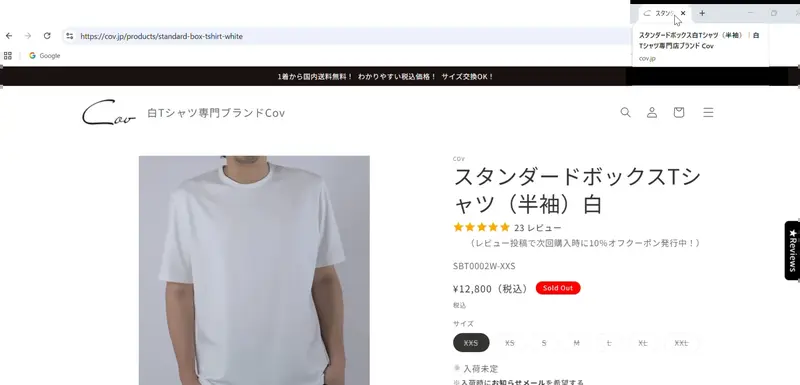
For example, Cov, an apparel shop specializing in white T-shirts, adds the phrase "Cov, a specialty brand for white T-shirts" to the header tags of its product pages, ensuring that it appears higher in search results when customers enter keywords such as "white T-shirt" into search engines.
7. Organize internal links.
Implement internal links within your website. Optimizing internal links allows search engine crawlers to navigate your site more efficiently, increasing the likelihood of your pages appearing in search results. Furthermore, it improves the user experience (UX) design, allowing visitors to efficiently access the information they need, ultimately leading to increased visitor engagement.
In particular, it is effective to concentrate internal links on key pages. However, be careful not to force links to irrelevant pages or overuse anchor text that doesn't clearly indicate the destination, as this could lower your site's ranking.
For information on how to measure and improve SEO results, please also refer to the "EC Site Analysis Guide."
The Complete Guide to E-commerce Site Analytics | Thorough Explanation of Frameworks, KPIs, and Tool Usage
8. Add alt tags to all images.
Alt tags (alternative text) are text used to describe the content of images displayed on a website. Adding descriptive text to images makes it easier for search engines to correctly understand the image's content, leading to higher rankings in search results and increased traffic from image searches.
Alt tags also play an important role in improving usability. When visually impaired users use screen reader apps, the alt tags of images are read aloud, allowing them to understand the site in conjunction with the image content.
For example, when adding an Alt tag to the following image, it's important to include specific information about the image, such as "a brown cat sleeping on a sofa."
Shopify allows you to enter alt text of up to 512 characters, but it is recommended to keep it concise and under 125 characters.
In the product management screen, click on the product name to go to the details page, then click "Product Media Item" > Media Preview Page > "Add Alternative Text" to enter alternative text.
For theme images, you can select the image you want to edit in "Online Store" > "Themes" > "Customize" and add text.
9. Use a responsive design theme.
Responsive design is a system that automatically adjusts the display of a website to fit the screen size of the device. Google recommends making websites mobile-friendly.
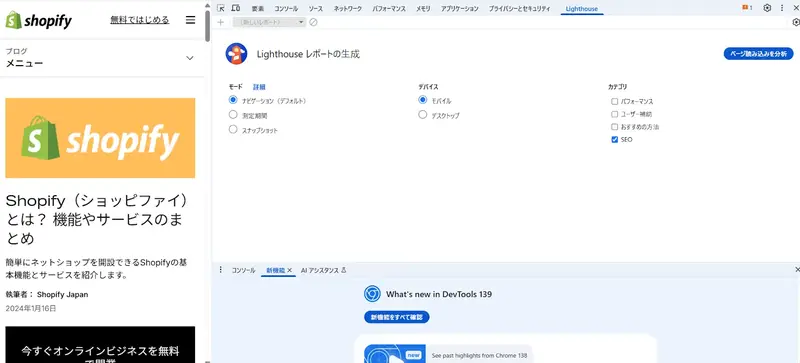
Shopify's official themes are generally responsive, so you don't need to change the design for SEO purposes. However, to make your site more user-friendly for mobile users, you should use Google's site analysis tool, "Lighthouse," to verify its functionality.
To verify, open the target page in Google Chrome, right-click, and select "Inspect." When the tools screen opens, click the Lighthouse tab, check "Mobile" and "SEO," and then click "Analyze page load." A report about the page, including scores, will be generated.
10. Increase the amount of content.
Increasing content such as product descriptions and blog posts that meet users' search needs is also a form of SEO. Creating high-quality content that is useful to users will increase site visitors and enhance credibility.
Furthermore, as the number of articles increases, there will be more places to place internal links, which will also lead to improvements in UX design.
When creating content, be sure to strategically set keywords and h1 headings.
11. Optimize image display speed
Google uses page loading speed as an SEO ranking criterion, so heavy images can slow down the overall page display speed and lower your search ranking. To improve display speed, compress image sizes or use file extensions like WebP, which are lighter than JPEG or PNG.
Additionally, using lazy loading (delayed loading) functionality, which loads images only when needed, is also effective. Improving page loading speed not only increases your search engine ranking but also helps prevent visitors from leaving your site.
Shopify also has an SEO app that enables lazy loading, making it easy to optimize page speed.
12. Set up Google Analytics
Google Analytics is a tool that analyzes how users behave on your website. While you can also obtain data through Shopify's store analytics, integrating Shopify with Google Analytics will provide you with more detailed data.
For example, you can measure the effectiveness of your SEO efforts by seeing which keywords and pages attract users visiting your Shopify store. You can also identify areas for improvement on your site and implement them into your SEO strategy based on metrics such as conversion rate, bounce rate, and time spent on pages.
13. Set up Google Search Console.
Google Search Console is a tool that analyzes data from when users enter keywords into Google search until they visit your website. It allows you to see which search keywords are attracting users, which is useful for measuring and improving the effectiveness of your keywords.
Furthermore, knowing which pages rank highly in search results allows you to adjust your page design based on that information.
14. Submit your sitemap to Google Search Console.
Submit your sitemap to Google Search Console. A sitemap is a document that lists the structure of your website.
By submitting a sitemap, search engines can discover all the URLs on your site, ensuring that changes to page content are quickly reflected.
Here's how to submit your sitemap to Google Search Console:
- Select "Sitemap" from the Google Search Console menu.
- In the "Add a new sitemap" section, enter the URL of your sitemap and click the "Submit" button.
15. Acquire backlinks
Backlinks are links from other websites pointing to your own website. Acquiring backlinks, especially from authoritative websites, can significantly improve your search engine ranking.
Focus on creating high-quality content, while also aiming to acquire backlinks through social media posting, networking with industry professionals, and utilizing press releases.
For tips on how to convert search traffic into sales, please also check out our "Guide to Successful E-commerce Sites."
The Complete Guide to Successful E-commerce Websites: Commonalities, Design, and Practical Framework for Improving Conversion Rate (CVR)
Recommended Shopify SEO apps
Download and use apps from the Shopify App Store that are helpful for SEO. Here are some apps that support Japanese:
Small SEO Speed Image Optimizer
Pricing: Free plan available. Paid plans start at $14/month.
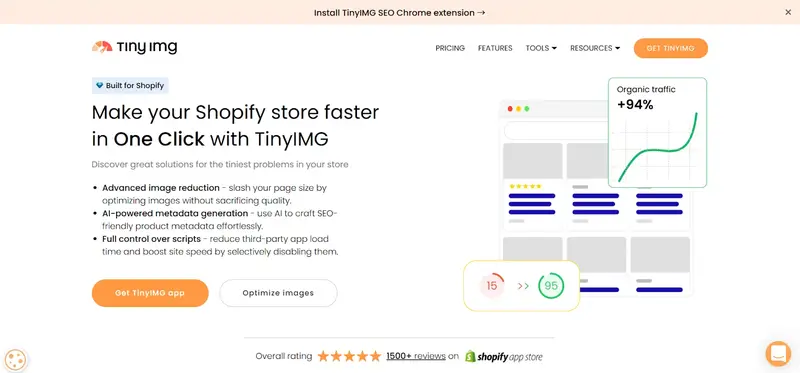
The compact SEO speed image optimizer is an app that can improve SEO through image compression, faster store page loading speed, and alt tag optimization. It also has a function to fix broken links.
SearchPie
Pricing: Free plan available. Paid plans start at $19/month.
SearchPie is an app that helps you identify SEO issues through reports and offers features such as bulk updates of alt tags and meta descriptions. It can improve your site's credibility through features like image compression, faster page loading, and automatic alt tag updates. It also comes with 24/7 free chat support.
Smart SEO
Pricing: Free plan available. Paid plans start at $9.99/month.
Smart SEO automates and manages important SEO tasks such as image optimization and page speed improvement. It also includes features like automatic link repair.
For SEO and UX improvements for mobile users, we also recommend the "EC Mobile Optimization Guide."
The Complete Guide to Optimizing Your E-commerce Mobile Platform | UI/UX, Display Speed, Checkout, and KPIs Explained
SEO measures, which increase website visitors, are essential for acquiring new customers and boosting sales.
Shopify offers a variety of features useful for SEO, including the ability to acquire a custom domain, integrate with Google Analytics, support responsive design, and set title tags. You can also enhance your SEO efforts using Shopify apps, so make good use of these features to improve your search engine rankings.
read more
- This guide explains how to set up and specify a domain name for your online shop.
- [How to Use Shopify] Opening an Online Store: Basic Setup
- [How to Create a Website] A 9-Step Guide for Beginners
- Easily implement performance-based compensation with the "Marutto Customer Acquisition" app.
- How to Start Cross-Border E-commerce: Why Shopify is Recommended for Overseas Sales Stores
- Shopify Official Store Setup Guidebook 2022 Edition Released! Start your online store with Shopify!
- [Must-Read Guide] Introducing Payment Services You Can Use with Shopify
- Email Marketing: Secrets to Emails That Get Open and Drive Results
- Starting affiliate marketing with Shopify: How to build an online store
For customer acquisition channels other than SEO, please also refer to the "EC Customer Acquisition Guide."
The Complete Guide to E-commerce Customer Acquisition | Practical Strategies Integrating SEO, Advertising, Social Media, and Email Marketing
FAQ
What SEO settings can be configured on Shopify?
- Setting the page title
- Meta description settings
- Integration with Google Analytics
- Improved page loading speed, etc.
What Shopify apps are useful for SEO?
What are the benefits of using Shopify for SEO?
- Since there are no advertising expenses, customer acquisition costs (CAC) can be reduced.
- Increase organic traffic and acquire new customers
- This allows us to understand user behavior and use that knowledge to improve the store.
For customer acquisition strategies that combine advertising and SEO, please refer to the "EC Advertising Guide."
The Complete Guide to E-commerce Advertising | Thorough Explanation of Different Types, Characteristics, and Best Practices for Operation
Share this article
- Share on Facebook
- Share on X
- Share on LinkedIn