跨境独立站开店
How to set up a custom domain: How to connect an external domain to Shopify
Simply put, a domain is your "address on the internet." Customers use this address to access your store. Here, we'll show you how to set up a custom domain for your Shopify store. This is essential reading for anyone planning to acquire a domain or who already owns one!


Simply put, a domain is your "address on the internet." Customers use this address to access your store. Here, we'll show you how to set up a custom domain for your Shopify store. This is essential reading for anyone planning to acquire a domain or who already owns one!
This article explains how to connect a custom domain obtained from a domain provider to your Shopify store.
When you start an online store with Shopify, you'll be given a free domain name in the format "○○.myshopify.com". However, if you already have a custom domain from an external domain provider, you can make management and operation smoother by connecting it to Shopify or transferring it. Just like with Japanese domain names, a store with a clear and easy-to-remember domain name leaves a good impression on customers, so be sure to set one up.
How to purchase and set up a shop domain directly on Shopify
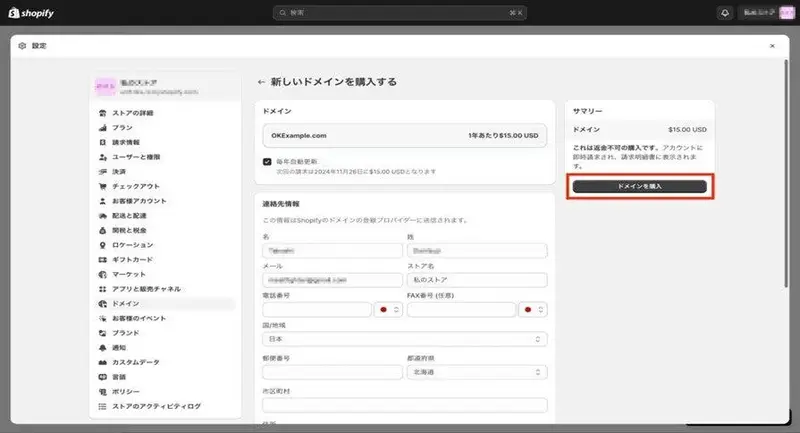
You can purchase and set up your store's custom domain directly through Shopify.
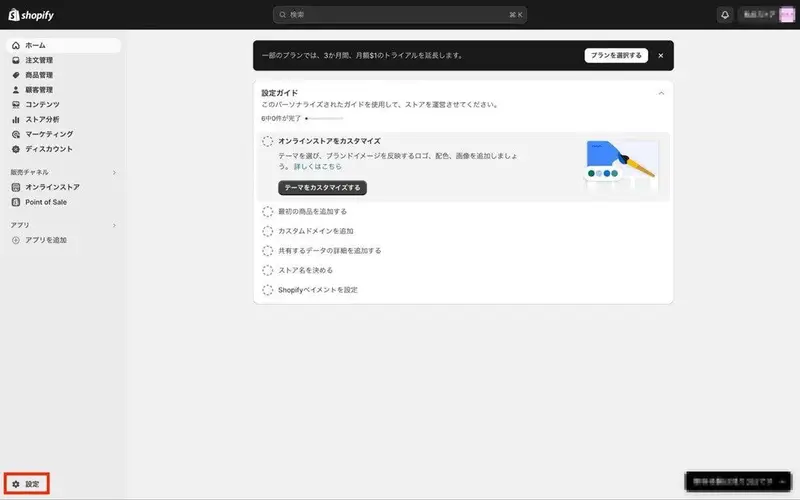
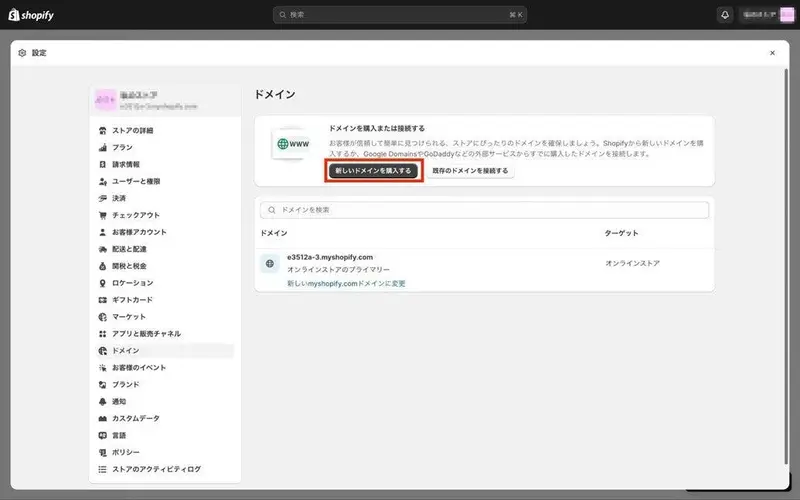
- Click "Settings" at the bottom left of the screen.
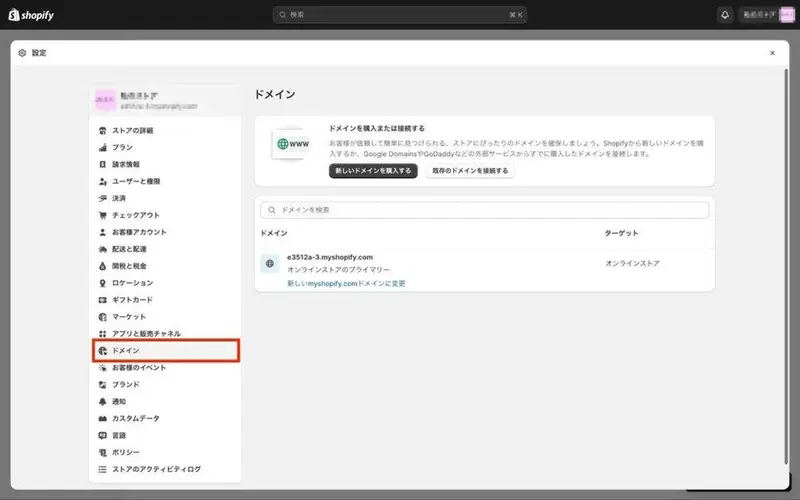
- Click on "domain".
- Click "Purchase a new domain".
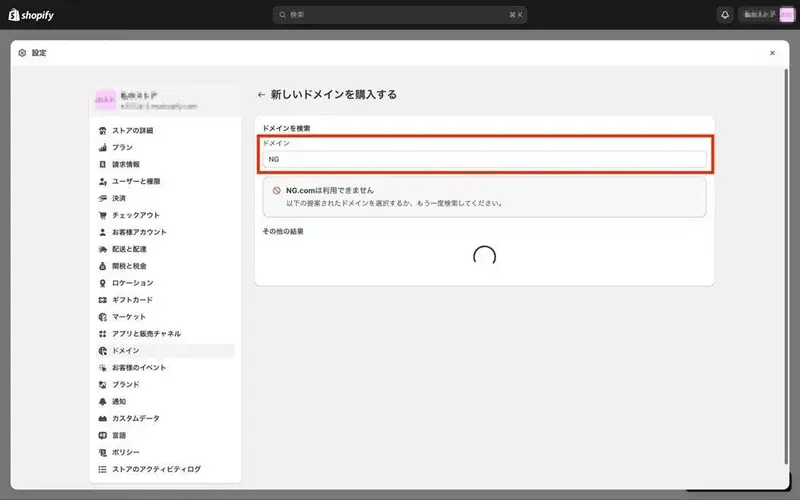
- Enter your desired domain name. If the domain name is already in use, an error message will be displayed.
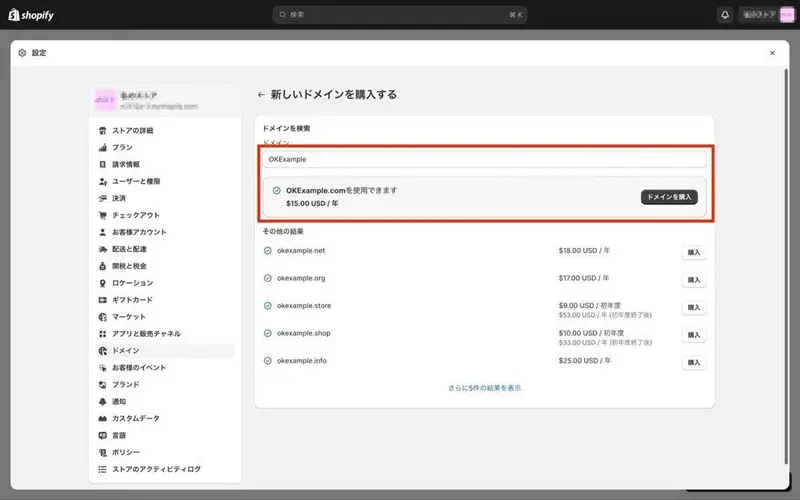
- After entering the domain name you wish to use, click "Purchase Domain".
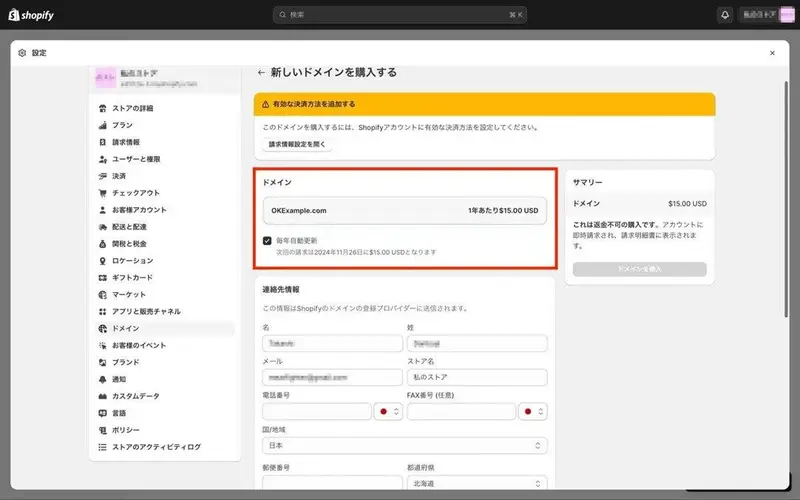
- If necessary, check the "Automatically renew annually" option and enter the required information such as your contact details, and the "Purchase Domain" button will become available.
- Click the "Purchase Domain" button to make the purchase.
- Please check your purchase confirmation email. It may take up to 48 hours for the domain to become fully operational.
If this is the first domain you've purchased that you're adding to Shopify, it will be automatically set as the first URL displayed.
How to change your Shopify shop domain to a custom domain
The procedure for manually connecting a custom domain acquired from an external source is as follows:
- Access the external domain you want to connect to and configure the following four items in the DNS management screen.
- Specify "A" as the record value type.
- Specify only IP address 23.227.38.65 (delete all other A records).
- (If necessary) Change the hostname to the @ symbol.
- Specify shops.myshopify.com. as the CNAME record for "www" (note the period at the end).
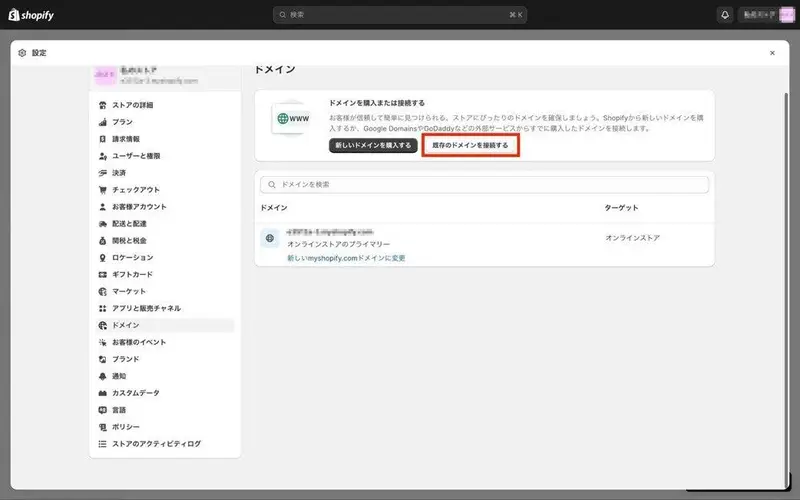
- In Shopify, click "Settings" at the bottom left of the screen.
- Select "Connect an existing domain".
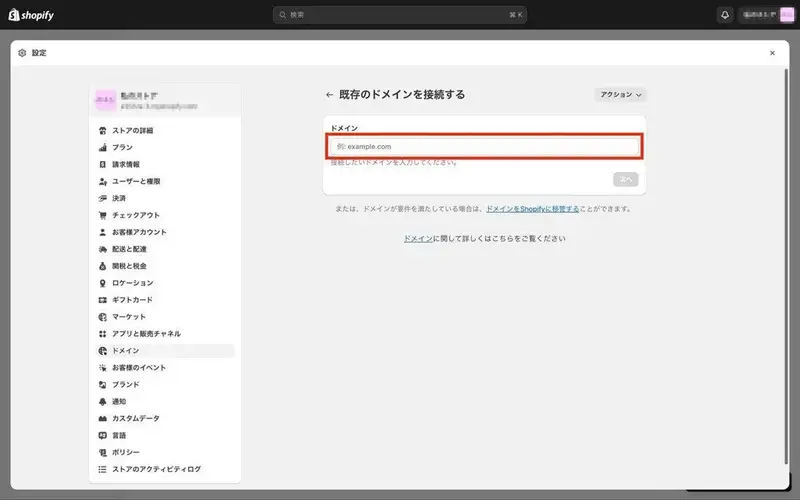
- Enter the custom domain you want to connect in the "Domain" field (you don't need to include "www.").
- Click "Next".
- After clicking "Check Connection," please verify that the connection is established. Please note that domain authentication may take up to 48 hours.
In addition to manually connecting if your provider is not supported, you can also connect using a subdomain. A subdomain is the part of a domain like "○○.shopify.jp" that says "○○," and as the name "sub" suggests, it functions like a subdomain of the main domain. Shopify allows you to use up to 20 subdomains, which has advantages such as making the "○○" part a clear service name that is easy for users to remember.
If you obtain your custom domain from a Shopify-compatible provider such as Google Domains, you don't need to configure it in as much detail as described above. You can connect to Shopify relatively easily by simply checking "Set up automatically" and clicking "Connect."
How to connect to popular external domain services
We will also explain how to connect to Shopify using popular external domain providers such as MuuMuu Domain and Onamae.com as examples.
MuuMuu Domain
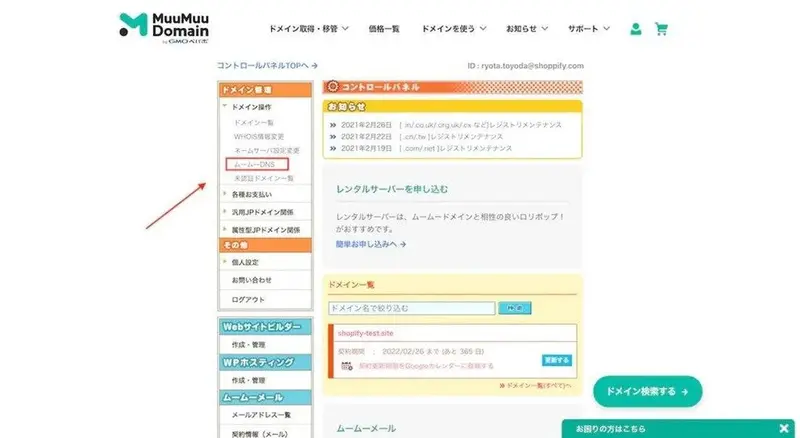
- Select "MuuMuu DNS" from the management screen.
- Click "Update" for the domain you want to connect to your Shopify store.
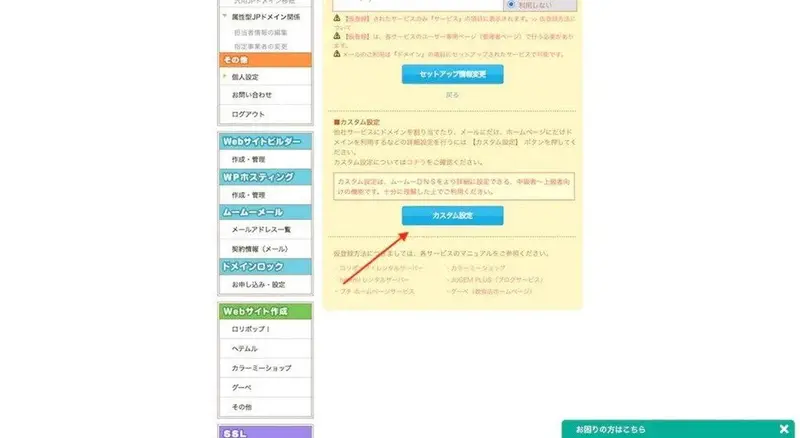
- Click "Custom Settings" at the bottom of the screen.
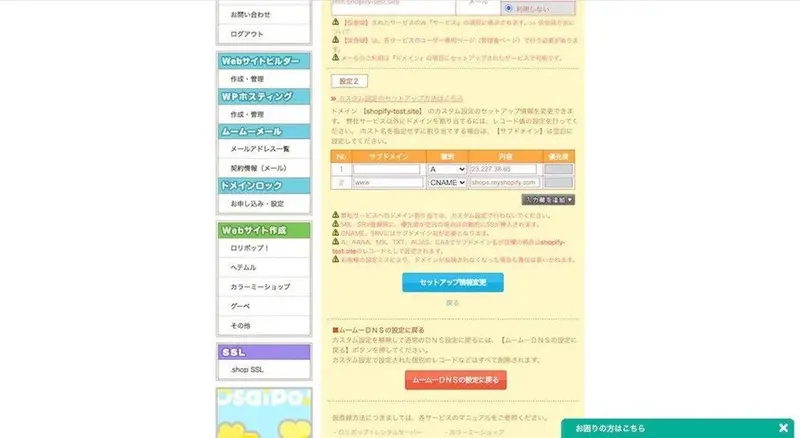
- In "Setting 2," configure the A record and CNAME record.
- In the Shopify admin panel, click "Connect an existing domain" under "Domains".
- Enter your custom domain name (www. is not necessary).
- Confirm that "Connected" is displayed, and you're done.
Please note that "SSL pending" will be displayed immediately after setup, but the connection will be established automatically after a short while.
Onamae.com
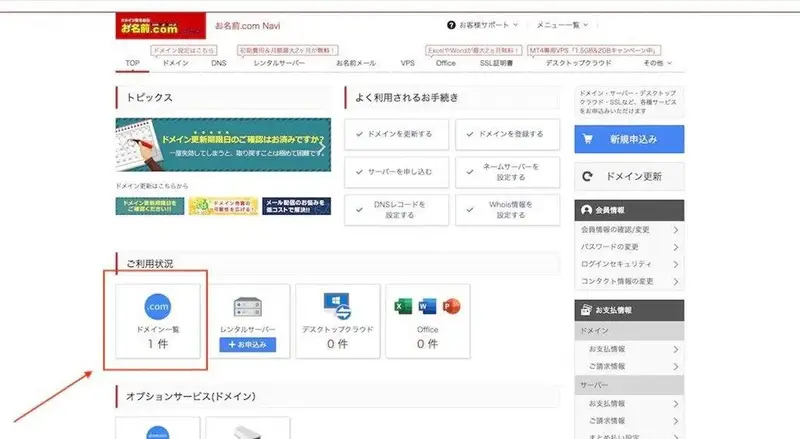
- From the administration screen, click "Domain List".
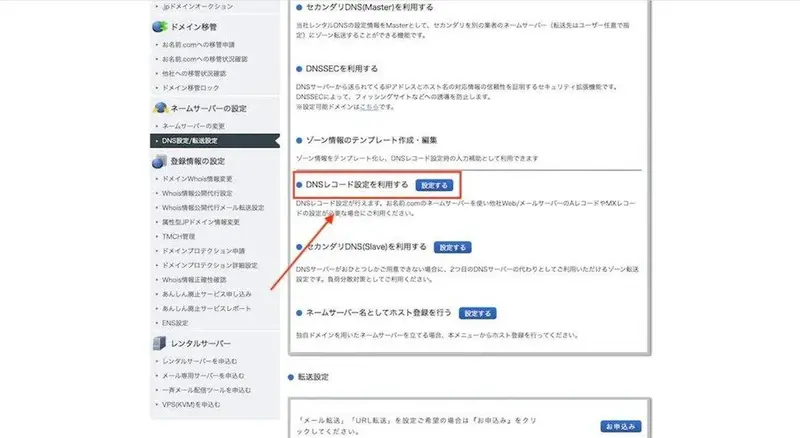
- Click "Settings" in the DNS record for the domain you want to connect to Shopify.
- Click "Configure" to the right of "Use DNS record settings".
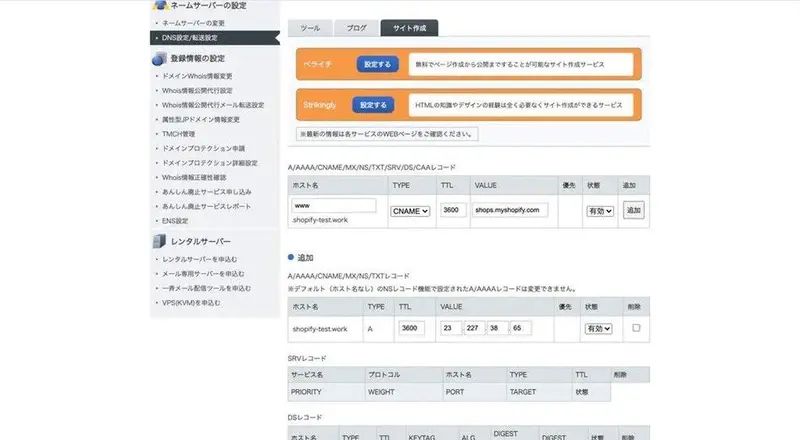
- Add an A record.
- Add a CNAME record.
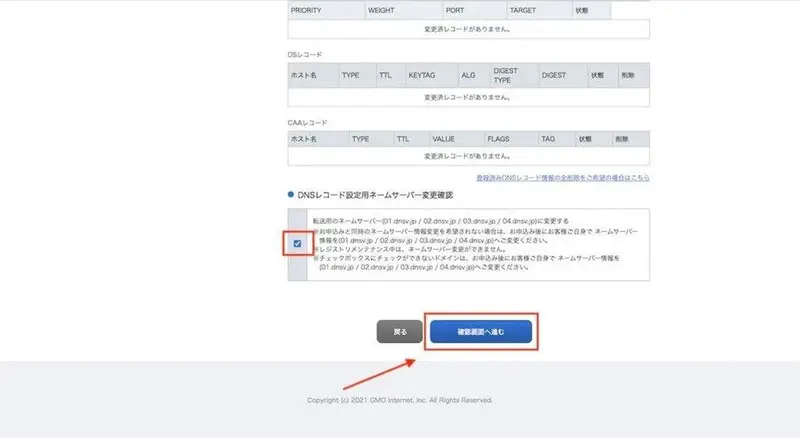
- Check the box for "Confirm name server change for DNS record settings".
- Click "Proceed to confirmation screen".
- After confirming, click "Set up".
- Confirm that "Connected" is displayed, and you're done.
How to transfer an external domain to Shopify
Transferring an external domain means transferring the entire domain management contract, which was previously handled by an external domain provider, to Shopify.
Managing multiple domain providers is cumbersome. Costs and procedures differ between providers. Instead of connecting external domains to Shopify, transferring them all at once centralizes contract procedures and payments, reducing overall costs, including time.
Please consider the following points when transferring your account. If the conditions are not met, the procedure cannot be completed.
- Does your current domain provider's terms of service clearly state their policy regarding domain transfers?
- Is it a domain like .ca or .co.uk that Shopify doesn't support?
- Has more than 60 days passed since the domain was registered?
Also, please note that only the "◯◯.com" part of a typical URL, such as "www.◯◯.com," can be transferred. Subdomains including "www." cannot be transferred.
Once you've met the transfer requirements, you can proceed with the process. The acquisition procedure varies depending on the domain provider, but in any case, you will need to perform steps such as "unlocking the domain" and "obtaining a transfer authentication code."
Additionally, the email address from your original domain provider will become unusable once you cancel your contract and transfer your domain.
The transfer process requires email authentication, such as clicking a link in an email. Therefore, to ensure continued use, please use an email address other than the one associated with your original domain when transferring. For example, if you are transferring the domain example.com, avoid using an email address like [email protected].
Once you have obtained the transfer authentication code, the transfer process is basically the same as described in the "How to connect with popular external domain services" section above.
The domain transfer may take up to 20 days from the completion of the procedure.
read more
- [How to Use Shopify] Opening an Online Store: Basic Setup
- COHINA's Merchant Story: Delivering perfectly sized clothing for petite women - COHINA
- Shopify Official Store Setup Guidebook 2022 Edition Released! Start your online store with Shopify!
- How to Start Cross-Border E-commerce: Why Shopify is Recommended for Overseas Sales Stores
- [Must-Read Guide] Introducing Payment Services You Can Use with Shopify
- Easily create an online shop! 9 recommended tools [2021 Edition]
- How to use Shopify with WordPress
- Google search results have changed! How to set a favicon on Shopify
- Import customer information into your store using a CSV file!
Frequently Asked Questions about Setting Up a Custom Domain
Is there a fee for using a domain name?
Domains are generally paid services, but if you set up a store with Shopify (which is a paid service), you will be given a free domain name in the format "○○.myshopify.com".
What other external domains can I connect to Shopify?
Other external domain providers that can connect to Shopify besides those mentioned in this article include Google Domains, GoDaddy, and 1&1 IONOS. Whether or not you can connect to Shopify depends on the specifications of the domain provided by each provider, not the domain provider itself. Connecting external domains may cause unexpected problems, so be sure to carefully check Shopify's guidelines.
What are the advantages of setting up a subdomain for an online shop?
Setting up subdomains creates consistency in your domain names, making them easier for customers to remember and access. Inconsistent domain names within the same service not only look bad, but can also make some users unsure if they've been redirected to an external site. If transferring from an external domain provider isn't possible, consider setting up subdomains.
Share this article
- Share on Facebook
- Share on X
- Share on LinkedIn