跨境独立站开店
Shopify API: April Release Information
This article summarizes the API features released in April 2020. Please take advantage of the latest API features to improve the quality of your application.

This article summarizes the API features released in April 2020. Please take advantage of the latest API features to improve the quality of your application.
The main changes in the 2020-01 release focused on the product, order, and shipping processing flows. This quarter's release addresses issues such as customs duty and tax calculation processing at checkout and updates to the storefront API.
Now, let's take a closer look at the new features released in April 2020, including validation during checkout and additional fields for the storefront API object.
- Calculation of customs duties and taxes
- Added validation for price comparisons using `compare at`.
- Additional fields for the storefront API related to products and orders
- Revealing the filenames of rich media files
1. Calculation of customs duties and taxes
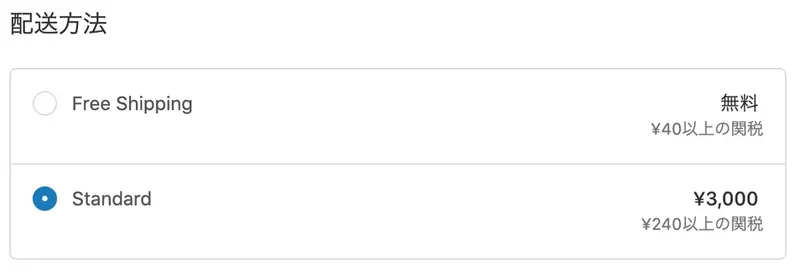
For merchants selling internationally, being able to have buyers pay customs duties at checkout reduces risk, as there are risks such as delays at customs, additional shipping charges, and buyers refusing to ship the goods.
The 2020-04 version introduces a developer preview of Duties and taxes. This allows you to see early on how clients can provide buyers with a clear total cost by estimating customs duties and taxes at checkout. It not only helps buyers pay customs duties, but also helps you understand where taxes fit into your app's workflow.
NOTE: During the developer preview period, customs duties and taxes will be placeholder values.
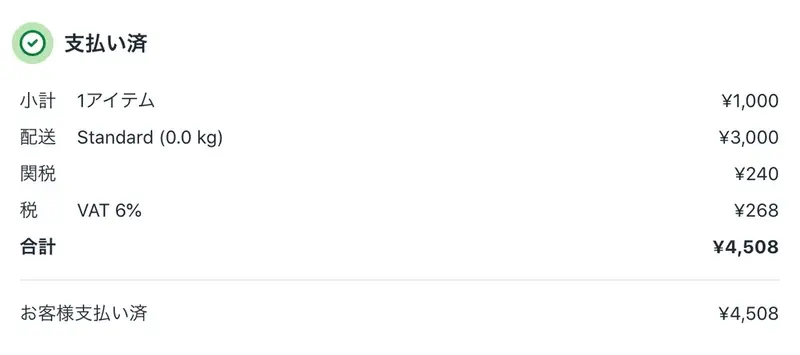
This release allows apps to read customs duties paid at the time of order via REST and GraphQL Admin APIs, and process refunds via the GraphQL API. A `duties` field has been added to the item details for orders in which refunds and customs duties are incurred. Order information can now refer to both the `current_total_duties_set` after the refund, as well as the `original_total_duties_set`.
Most importantly, the total_price_set for an order will now include customs duties paid at checkout in all API versions. Once this feature is launched for merchants, all stores that offer customs and tax calculations will default to displaying the total order amount including customs duties, and will also need to process customs duties for applicable orders when issuing refunds.
For details on refunds of customs and tax information via the API, and for app updates to include customs duties, please check out the tutorial.
2. Add validation for price comparisons using `compare at`.
To ensure apps can trust the relationship between `compare_at_price` and the `price` field value, validation has been added to ensure that the compared price is always higher than the actual price. This change allows apps to display `compare_at_price` in new areas such as receipts without worrying about odd values.
Validation is only applied when any field is modified, so in apps using libraries that pass the entire object, validation will not be involved if unrelated fields such as variation weights are modified.
For more information on this new validation feature, please refer to the version control guide.
3. Additional Storefront API fields related to products and orders
The 2020-01 version introduced order editing functionality, allowing for more comprehensive management of shop orders, including editing product details and existing orders. The Storefront API's Order object has been updated to reflect these new features, and new fields have been added to ensure accurate display of custom storefront orders, even after editing.
The new storefront Order object includes not only LineItem objects, but also order editing information, shipping status, and price details.
As part of the 2020-04 version, we are also releasing new fields in the Storefront API to support translation, internationalization, and inventory status and counts.
For a complete overview of the new Storefront API fields, please see the release notes.
4. Disclosure of rich media filenames
The latest API version introduces media integration for products in GraphQL. To simplify handling media files, we now expose media filenames using two new fields: `expose_video_filename` and `expose_model3d_filename`.
For information on how to use this connection and how to incorporate rich media experiences into your product pages, please refer to our product media usage guide.
Postponement of the discontinuation of the 2019-04 version
As we announced in a previous post, in order to allow us to focus on supporting other partners and merchants under the current circumstances, we have decided to postpone the deprecation of the 2019-04 version to July 1, 2020. Instead, both the 2019-04 and 2019-07 versions of the API are expected to be deprecated on July 1st.
This delay means that on July 1st, pagination for all endpoints will change from page-based to cursor-based, simplifying the app migration process. You can find more details about app migration in our post on how to use relative pagination.
Thank you to everyone who worked hard on the update and for your understanding and cooperation. You are already one step ahead, so now we would like you to focus on the most pressing issues for your own business, clients, and app users.
Please check for the latest information regarding the changes.
read more
- Shopify Partners' Response to COVID-19
- The importance of clearly stating delivery times in online shops
FAQ
What API features were released in April 2020?
How can I check for the latest information on changes?
Regarding the postponement of the discontinuation of the 2019-04 version
Grow your business with the Shopify Partner Program. Whether you offer marketing, customization, web design, or development services, the Shopify Partner Program will guide you to success. Joining the program is free, offers revenue-sharing opportunities, and provides access to a wealth of tools to grow your business. Join our passionate commerce community today!
Share this article
- Share on Facebook
- Share on X
- Share on LinkedIn