跨境独立站开店
Import customer information into your store using a CSV file!
In the previous article, I explained how to import product information into your Shopify store in bulk using a CSV file.
In the previous article, I explained how to import product information into your Shopify store in bulk using a CSV file.
Read the article here
Now, this time I'll explain how to import customer information into your store in bulk using a CSV file.
Let's get started!
Step 1
When importing a CSV file into your Shopify store, the most important thing is to edit the fields in the file to match the format specified by Shopify. (A list of fields for the CSV file used in your store is included at the end of this article. Please check it!)
A sample CSV file of customer information is available here.
Additionally, Shopify recommends using Google Sheets when creating CSV files.
Step 2
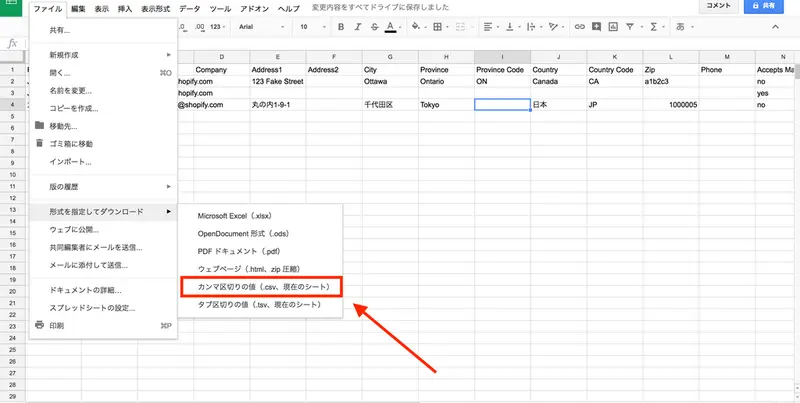
Once you've created the CSV file in Google Sheets, go to File > Download as > Comma Separated Values (.csv current sheet) and download it.
Step 3
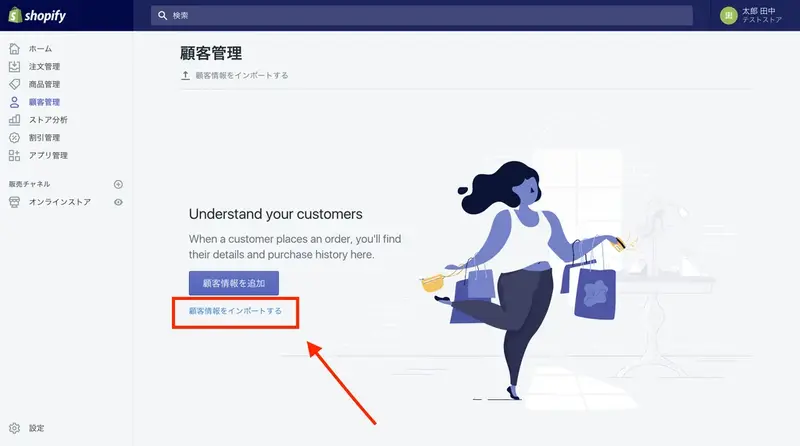
Return to Shopify. From the admin panel, select Customer Information. Click "Import Customer Information".
Step 4
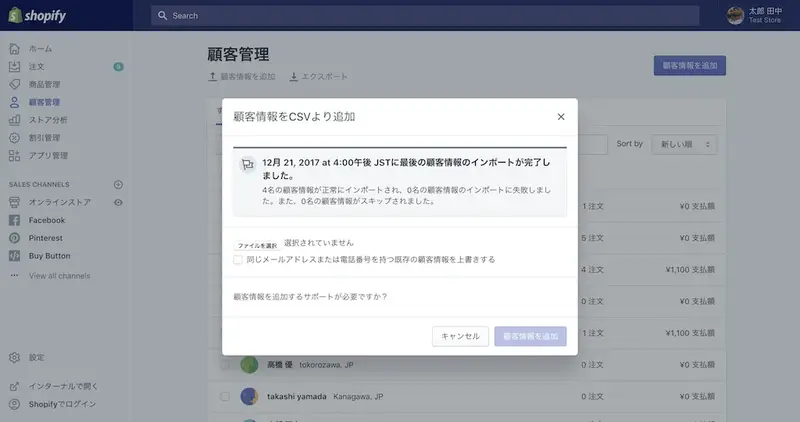
Please select the specified CSV file from "Select File".
Checking the checkbox will update the information of customers who have the same email address or phone number.
Next, please click "Add Customer Information".
And that's it! It's done!!
List of items in a CSV file
How was it? Customer information can also be easily imported using a CSV file.
read more
- Shopify Email - Grow your brand with email marketing
- How to Start Cross-Border E-commerce: Why Shopify is Recommended for Overseas Sales Stores
- [Thorough Comparison] Want to open an online shop? What services are recommended?
- The "Japan Order CSV" app allows you to output a CSV file for shipping with one click (compatible with Yamato B2 Cloud).
- Streamline Shopify data import/export with Matrixify. Japanese language support is also available.
- How to use Amazon Pay in your Shopify store
- Shopify Online Store 2.0: Its Significance for Developers
- Let's try using the Shopify admin panel in Japanese!
- How to verify your domain and site in your Shopify store.
FAQ
What is a CSV file?
How can CSV files be used in Shopify?
Is it possible to export the data?
I can't open the CSV file properly. What should I do?
I'm stuck importing a CSV file. What should I do?
Share this article
- Share on Facebook
- Share on X
- Share on LinkedIn