跨境独立站开店
Ideas for Improving Business Efficiency: Shopify Flow
As your business expands, tasks such as order processing, payment reconciliation, and inventory management become paramount. Here's how to streamline these processes.

As your business expands, tasks such as order processing, payment reconciliation, and inventory management become paramount. Here's how to streamline these processes.
As your business grows, inventory management and fulfillment processes can become inefficient and cumbersome. Repetitive tasks that were once manageable can hinder your most important daily business growth.
Tasks such as order fulfillment, payment reconciliation, and inventory management make time management even more challenging. While excellent time management is crucial for growing your business without impacting daily operations, how can you increase your time each day?
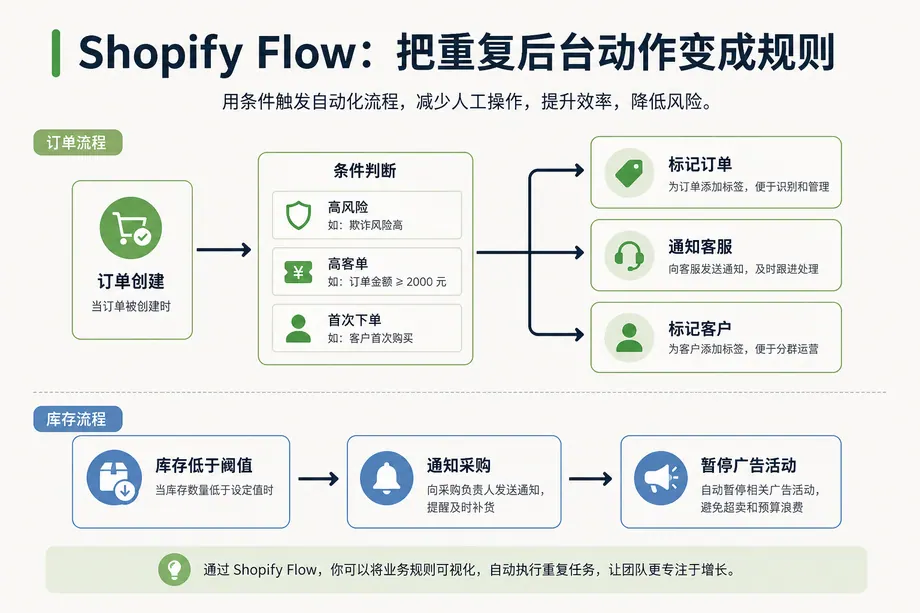
This is where Shopify Flow comes in handy. This excellent e-commerce automation tool helps you handle everyday back-office tasks with less effort, freeing up valuable time.
Flow lets you build workflows to automate your daily tasks, streamlining your operations without touching any code. Use ready-to-use templates or quickly create customized workflows tailored to your specific business needs.
Below are 10 Shopify Flow workflows that streamline inventory management and fulfillment tasks.
1. Prepare a draft of the Shopify shipping label.
According to a Shopify report, 37% of online shoppers are dissatisfied with delivery times. Making the fulfillment process as efficient as possible is more important than ever.
A good way to streamline fulfillment is to identify orders that are consistently processed in the same way and automatically prepare their shipping labels. For example, you might use the same label attributes for specific products, shipping methods, or fulfillment countries.
Using these templates, you can automatically prepare draft shipping labels for specific orders, and all you have to do is review and purchase them.
2. Notify the fulfillment team of the delivery immediately.
To meet customer delivery expectations, ensure your fulfillment team prioritizes orders that require priority shipping.
This template sends an email to the fulfillment team for orders for which priority shipping fees have been paid, and adds tags to make organization easier.
3. Manage inventory and reorder low-stock items.
Inventory automation is crucial for growing brands. It not only streamlines team operations but also contributes to an improved customer experience.
This workflow allows you to automatically reorder items that have reached low stock levels.
The team automatically receives notifications, and Flow sends reorder emails to vendors. Additionally, tags are added to highlight low stock levels, creating a sense of urgency for customers.
4. Organize your products by attaching tags.
When importing new products into your store, it's crucial to tag them properly and organize them into the correct collections. While taking the time to do this is important for improving search results for your team and customers, this task can become cumbersome as your business grows.
This workflow automatically tags products, ensuring they are properly labeled and displayed in the right place, streamlining inventory management, and making it easier for customers to find what they're looking for.
5. Hide/Show items
When an item is out of stock, it's crucial to inform the customer. If they can access the product page but cannot purchase it, it will cause frustration. To avoid this problem and increase opportunities for other product sales, consider a workflow that hides and redisplays items at the appropriate time.
When a product goes out of stock, this workflow automatically hides it from the online store and notifies the marketing team to temporarily suspend marketing activities that include that product.
When the product is back in stock, it will reappear on the online store and notify the marketing team to resume advertising.
6. Check for high-risk orders.
Handling high-risk orders is complex. This process often involves manual order confirmation, contacting facilities, and paying product costs and chargeback fees. Custom apparel retailer Shelfies has found an efficient way to address this problem.
We used Shopify Flow to set up a workflow that instantly identifies orders flagged as high risk and automatically sends emails to the printer instructing them to stop production and cancel the orders.
To flag high-risk orders, use this template to configure an action that sends an email or Slack notification to your customer service team to review high-risk orders.
If the order risk is not very high, we will automatically capture the payment. For this workflow to work correctly, manual payment capture must be set up for your store.
7. Cancel, refund, and restock orders from malicious customers.
Stores offering flash sales or exclusive, unique products should be wary of bots and scammers. During peak seasons like Black Friday, Cyber Monday, and Christmas, you need to be prepared for these malicious actors.
Flow can help you deal with these activities. Set up this template and obtain the reseller's email or IP address.
If a customer on your blocklist places an order, Flow will automatically cancel the order and restock the item in your inventory. This increases the chances that other customers will be able to purchase the item.
8. Check the fulfillment status after the set number of days.
According to one report, 58% of online shoppers expect free next-day delivery. This means brands need to fulfill orders faster than ever before. And if something goes wrong, they need to resolve it quickly and contact the customer to let them know what happened.
The check-on fulfillment flow template helps manage this process more efficiently. Using this template, you'll automatically receive a Slack message notification if fulfillment isn't completed within two days. Details of delayed orders are also tracked in a spreadsheet.
As a result, you can constantly monitor delays and delayed fulfillments, proactively communicate with customers, and have opportunities to manage or improve their shopping experience.
9. Track special orders based on the specified conditions.
Manually managing and tagging special orders is time-consuming, inefficient, sometimes requires coordination with multiple parties, and can lead to human error.
A great conditional template for tracking special orders based on conditions automatically adds order tags and notifies you when a specific type of order is created. You can use operators and conditions that can be used in the following situations:
- The customer's email address contains ".ac.jp" or your domain name.
- Segment-specific discount codes are being used (or not being used).
- Orders from specific sales channels
- Orders from a specific billing country (or not)
- Customers making tax-free purchases
- Free shipping
- A specific payment gateway is being used.
- The discount on the order exceeds the set threshold.
This workflow can be customized in various ways to suit your business needs.
10. Gain insights into returns.
Returns offer a brand an opportunity to improve the customer experience and build a foundation of loyal customers. In fact, 96% of buyers say they are more likely to buy again if they are satisfied with a merchant's return process.
This workflow allows you to tag customers who have received refunds of 10,000 yen or more. You can then create a support ticket specifically for that customer to follow up, find out why they were dissatisfied with the product or shopping experience, and discover ways to improve.
Shopify Flow's convenient and customizable templates help streamline your back-office operations and reclaim your most valuable resource: your time. Start using Flow today to automate your daily tasks and focus on building your business by accomplishing more.
Share this article
- Share on Facebook
- Share on X
- Share on LinkedIn