 跨境独立站开店
Store operations | Shopify Retail: Release Summary
Check out the latest Shopify POS updates to support your retail business growth: POS app versions 11.17 and 11.18

Check out the latest Shopify POS updates to support your retail business growth: POS app versions 11.17 and 11.18
Shopify is constantly evolving, regularly releasing new features and updates to help retailers stay competitive. However, keeping up with the latest information can be a challenge. That's why this page allows you to track all POS updates and related Shopify changes in one place.
Shopify releases updated POS versions every two weeks, and this post will also be updated to highlight new features. If you run multiple stores, it's a good idea to use MDM (Mobile Device Management) to manage app versions and test each new release on several devices before rolling it out to all your stores. Scroll to the bottom of this post to see updates from previous months.
POS version 11.17 and 11.18 update
- Get smart grid tile candidates
- Customer recognition and receipt simplification
- Add product variations and shortcuts to smart grid
POS version 11.18 update (released October 26, 2026)
That time of year has come again. For the remainder of 2026, we've paused major releases to the POS app, and Shopify POS versions 11.18 and 11.19 are focused solely on background bug fixes and reliability improvements. This means there will be no changes to the functionality of the POS app during the Christmas shopping season, allowing you to focus on what really matters.
These smaller releases focus on improving the experience to reduce friction and create a smoother customer flow, but we will continue to add monthly retail-related changes from the Shopify platform to this page through January.
POS version 11.17 update (released October 13, 2026)
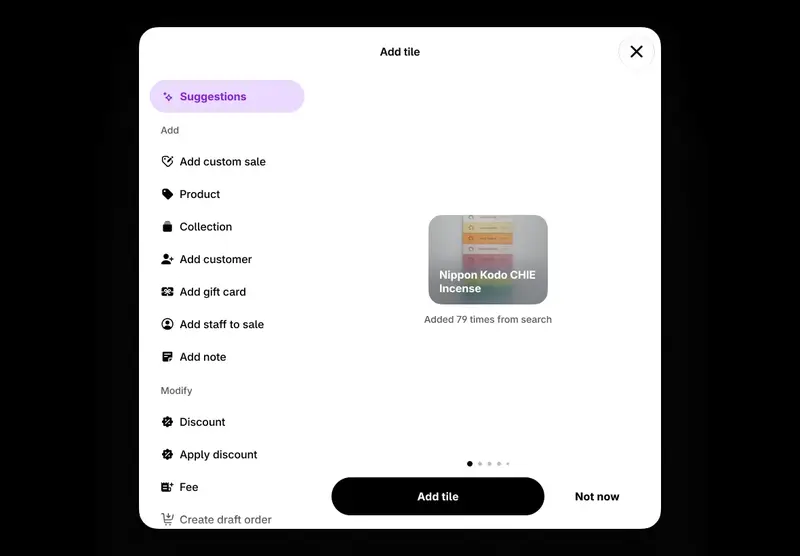
Alt text: Shopify POS tile addition screen showing recommended product tiles
Changes: Shopify can now suggest smart grid tiles for products and discounts that your staff frequently use, based on your store's POS activity. You can add suggestions directly from the POS tile addition flow or view them alongside the smart grid in the POS editor in your Shopify admin. You decide what to add or remove, and the smart grid will not change unless you choose to update.
Key reason: Reduce the time spent setting up and maintaining smart grids, and help staff have faster access to frequently used products, variations, and discounts.
Access: Available in POS v11.17 via the POS editor. The suggestion will be displayed to users who already have permission to edit the smart grid.
View details of smart grid candidates
Changes: POS can now automatically identify more in-store customers at checkout. When a customer taps their card, Shopify can select a digital receipt, recognize the customer, and add them to the customer list.
Repeat customers are automatically associated with orders, and for Shop Pay customers, in-store receipts are automatically sent to the Shop after initial consent.
All customers can also sign up for marketing, news, and updates from the receipt selection screen.
Key reason: By automatically identifying customers, staff can save time asking for customer information at the checkout, allowing customers to be added to the customer list without delaying the line, and past orders can be linked to the purchase history of repeat customers.
Having more known customers allows you to identify who your repeat customers are, and if they opt in to your marketing, you can bring them back, increase repeat orders, and boost their lifetime value.
Access: Available for Shopify Payments card transactions in POS version 11.17. It is enabled by default if you have a customer-facing display such as Victa Mobile or POS Terminal, or if customer receipt selection is enabled in the POS sales channel in the admin panel.
Review customer recognition and digital receipt details.
Changes: Shopify POS now allows you to add specific product variations directly to your smart grid, enabling staff to add frequently selling variations to their cart with a single tap. New shortcut tiles give staff direct access to analytics, register, and scan, while pickup and local delivery tiles now open the order list directly.
Key reasons: Staff can reduce the time they spend repeatedly selecting variations or navigating menus to access tools they use throughout the day. Merchants can customize the smart grid to match the actual way their stores operate, making it easier for staff to find common products and everyday tasks.
Access: Available to all merchants using POS version 11.17 or later. Merchants can add new tiles directly from the POS editor in the Shopify admin or from the POS app. Analytics requires POS Pro and appropriate staff permissions. Existing smart grids will not be automatically modified.
Learn more about customizing your smart grid.
Check past updates
September 2026 (V11.15 & V11.16) (English)
August 2026 (V11.12, V11.13 & V11.14) (English)
July 2026 (V11.10 & V11.11) (English)
June 2026 (V11.8 & V11.9) (English)
May 2026 (V11.6 & V11.7) (English)
April 2026 (V11.5) (English)
March 2026 (V11.1, V11.2 & V11.3) (English)
February 2026 (V10.20, V11.0) (English)
January 2026 (V10.19) (English)
Growing the retail business
We bring you exclusive behind-the-scenes stories from merchants, industry trends, and tips for creating outstanding in-store experiences.
POS system suitable for all types of sales



