跨境独立站开店
Shopify Webhooks: Prepare your app for the BFCM period
While the information below is still valid, the best way to manage webhooks now is to use Amazon EventBridge. EventBridge's serverless, event-driven architecture enables a highly scalable system while reducing infrastructure costs.

*Updated in September 2020
While the information below is still valid, the best way to manage webhooks now is to use Amazon EventBridge. EventBridge's serverless, event-driven architecture enables a highly scalable system while reducing infrastructure costs.
For more details, please see this blog.
Believe it or not, the holiday season is just around the corner. Shopify app developers need to prepare. During the busiest time of the year, you can't afford app glitches or interruptions. You need to be able to handle a surge in orders and keep up with the constant updates to customer and product information.
Many Shopify developers utilize webhooks (notification messages sent in response to events occurring within Shopify). Shopify webhooks are an efficient way to track changes on the e-commerce platform, allowing apps to be notified via push notifications when something happens in Shopify.
Until you actually start receiving webhooks on a certain scale, it's difficult to predict when and how many will be sent. When we launched our first app, Rewind, we were surprised to see a large number of webhooks being sent from stores every night.
What we learned from our customers is that these webhooks are sent when third-party systems sync with Shopify data. For example, an inventory system that syncs daily will send thousands or even tens of thousands of webhooks to the app without any warning.
This article explains how to build a system that handles webhooks offline, allowing your app to process the load from Shopify. This will enable your team to process webhooks as quickly as possible. Because this system is built on a serverless architecture, it can handle large loads automatically without incurring high costs.
Building a system to handle Shopify webhooks
Shopify requires apps to respond quickly to webhooks. If they can't, they'll be removed. Handling Shopify webhooks inline when they occur can be a big problem because your app needs a powerful server to handle any webhooks that might be sent. Since you never know when a webhook will be sent, running a powerful server 24/7 can be quite expensive.
Even with a large number of servers running, there are still risks in terms of fast response times, loss of webhook data, and the potential cancellation of Shopify webhooks in the future.
A good way to address these issues is to separate your systems and configure them in advance to respond quickly to Shopify. By immediately recognizing Shopify webhooks and storing the data elsewhere, the webhooks won't be canceled, and you'll be able to process the data in the future. You'll never miss webhook data, and your app won't lose any sent data.
"By quickly recognizing Shopify webhooks and storing the data elsewhere, the webhooks won't be canceled, and you'll be able to process that data in the future."
This blog post explains the system we built for Rewind using Amazon Web Services (AWS). We're using API Gateway, Lambda, and an SQS queue. When Shopify sends a webhook to Rewind, it's processed by API Gateway and Lambda. These two are AWS "serverless" services that automatically scale to demand. The message is stored in an SQS queue that stores the data from the webhook. The server processes the webhook queue at a rate you manage. The steps required for this are as follows:
1. Setting up an SQS queue
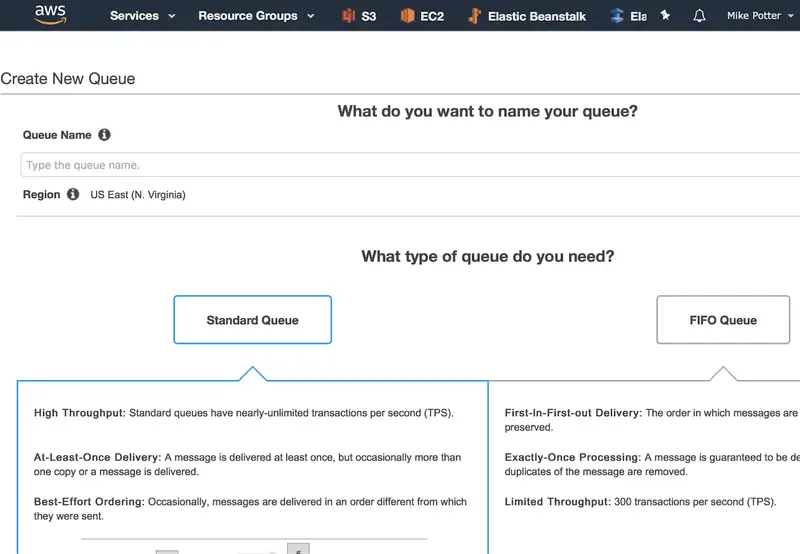
The first step in the process is configuring the SQS queue. SQS has two types of queues: First-In/First-Out (FIFO) queues and standard queues. Use a FIFO queue if you want to maintain the order of webhooks. Alternatively, you can use a standard queue and refer to the updated_at of messages. Both work, so you'll decide which to take depending on your use case.
Configure an SQS queue on AWS.
2. Configuring the Lambda function
AWS Lambda allows you to run your code on AWS servers without managing your own servers. This is commonly referred to as "serverless" architecture (although the servers are actually in the cloud). Lambda servers are operated by Amazon and automatically scale to handle increased load. You only pay for the amount of code you actually run, making it very cost-effective to operate.
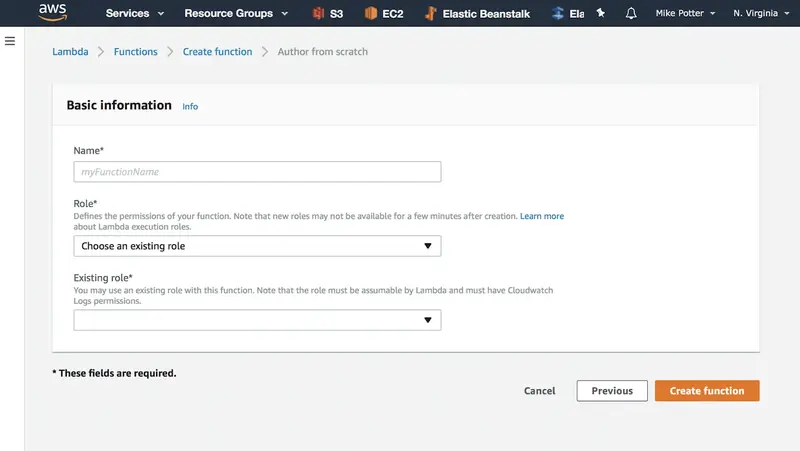
To get started with Lambda, first create a new function. This code takes incoming information from the API Gateway (which you'll configure in the next step). Then, after verifying the security of the webhook (to confirm it's being sent from Shopify), attach it to the SQS queue you created in the first step.
Let's look at the code.
Configuring the Lambda function.
3. API Gateway Configuration
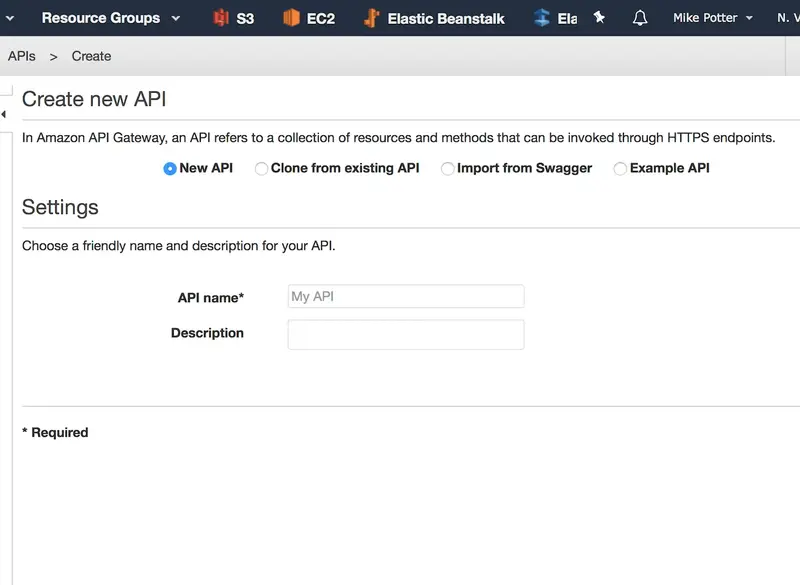
Once Lambda is set up, the next step is to configure API Gateway. API Gateway provides a way to identify APIs and runs on AWS without requiring a server. Instead of using a server, webhooks go through this API Gateway. This approach allows you to scale with the volume of webhooks without worrying about server operation.
API gateway configuration.
To use the API gateway, first create a new model with the following schema.
The following mapping template is configured for the integration request.
4. Configuring the Elastic Beanstalk Worker
The final part involves the Elastic Beanstalk worker processing the SQS queue. The Elastic Beanstalk worker automatically extracts items from the SQS queue and POSTs them to the machine's localhost.
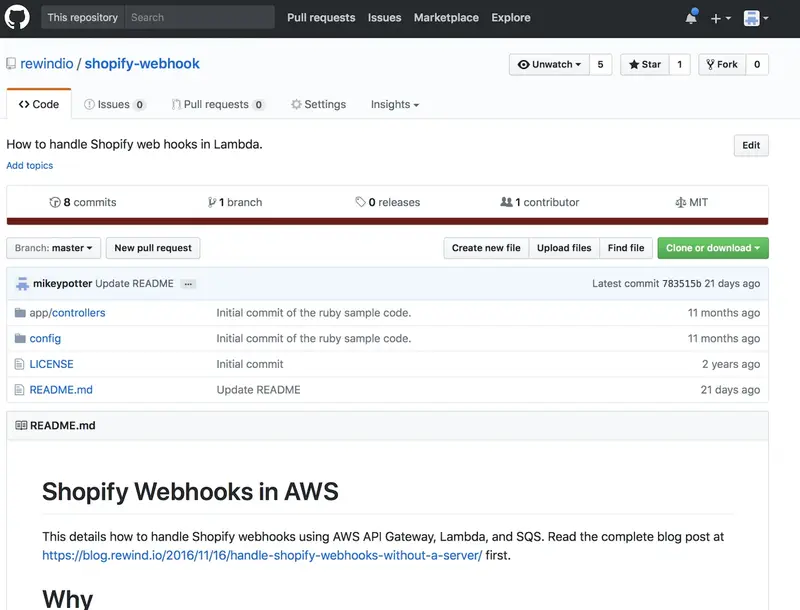
Our worker is a simple Ruby application written in Ruby. The code can be easily found on GitHub. The code for this serverless webhook system is open source, so we welcome your contributions to improve it.
The code for handling webhooks is open source and available on GitHub.
Checking the results
We've actually used this system in our Shopify app and achieved great success. We can handle hundreds of thousands of webhooks daily, while controlling when and how quickly they are processed. This method gives us the freedom to simplify database management tasks without worrying about impacting our app.
Elastic Beanstalk workers process SQS messages efficiently and quickly. You can add workers as the queue size increases, so the database will be the limiting factor. It's also inexpensive for its scale; approximately $0.01 per 10,000 webhooks.
Webhook protection is essential with BFCM.
To ensure merchants can effectively use their apps, it's crucial to prepare for surges in orders on BFCM. If your app is struggling to handle Shopify webhooks, this system can help you manage heavy loads while keeping costs down.
Share this article
- Share on Facebook
- Share on X
- Share on LinkedIn