 跨境独立站开店
How to increase sales with draft orders on Shopify
Shopify's draft order feature supports online stores by providing sellers with the flexibility to manually create and customize orders on behalf of their customers.
Shopify's draft order feature supports online stores by providing sellers with the flexibility to manually create and customize orders on behalf of their customers.
In today's highly competitive e-commerce environment, adaptability and personalized service are essential for success. Shopify supports brands by providing a versatile solution that goes beyond the typical online shopping experience, handling direct sales interactions and custom orders. That solution is draft orders.
What is a draft order?
While most e-commerce orders are placed directly through the online store, certain transactions, such as creating custom B2B quotes or taking orders via email, may require staff intervention. In such cases, merchants can manually create orders on behalf of customers through draft orders.
Merchants enter customer information, add products, customize orders, and then send customers a secure invoice link, guiding them through Shopify's world-class checkout experience. Merchants can then enter payment information to complete the order or postpone payment.
Why draft orders are important
Draft orders allow merchants to engage with customers through multiple channels, including phone calls and in-person interactions.
This allows merchants to connect with customers wherever they shop and capture sales that might otherwise have been lost. This approach also facilitates expansion into new sales channels such as events and trade shows, providing growth opportunities.
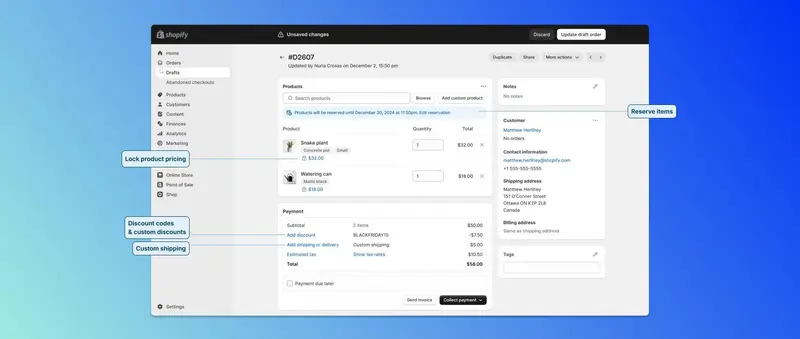
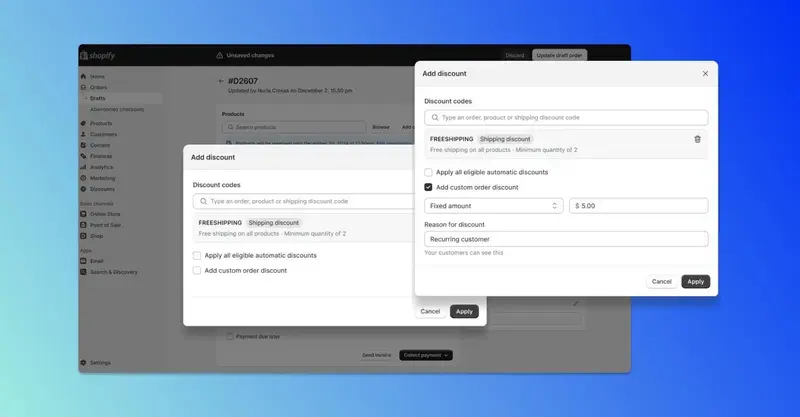
Draft orders give merchants greater control over the sales process. Highly customizable, they allow merchants to wholesale, apply custom discounts, and even create custom row fields that are not tied to products in their online store.
Additionally, you can override store settings to accommodate customer exceptions as needed. For example, even if a product is not publicly available in a particular market, the product availability rules do not apply to draft orders, allowing merchants to create draft orders for customers in that market.
For B2B merchants, draft orders play a crucial role in the order process for sales and customer service teams. They are particularly effective for orders requiring more personalized attention, such as negotiated quotes.
When a draft order is created for a customer associated with a company, all relevant information, including customer-specific pricing and payment terms, is automatically applied and displayed to the sales staff.
This benefit also extends to phone orders, where sales staff can instantly access necessary information and build orders with customers in real time, helping to expedite order completion and reduce potential errors.
Draft orders support all aspects of assisted selling by fostering relationship building and personalized selling through direct customer engagement in the ordering process.
By addressing potential purchase barriers and providing convenient order confirmation and payment processes, merchants can increase the likelihood of order completion and drive sales growth.
New features in Winter '25 Edition
Merchants expect a consistent and intuitive experience across Shopify. Key features that work in other areas of the platform, such as checkout and fulfillment, should also work with draft orders without requiring manual workarounds.
In this edition, Shopify has introduced new features and improvements aimed at integrating draft orders with other parts of the platform.
For example, customizations made with Checkout Extensions are now applied to draft orders in both the sales staff's admin panel experience and the customer's checkout experience. These improvements give merchants a more consistent experience and reduce errors and workarounds.
Checkout customization for draft orders
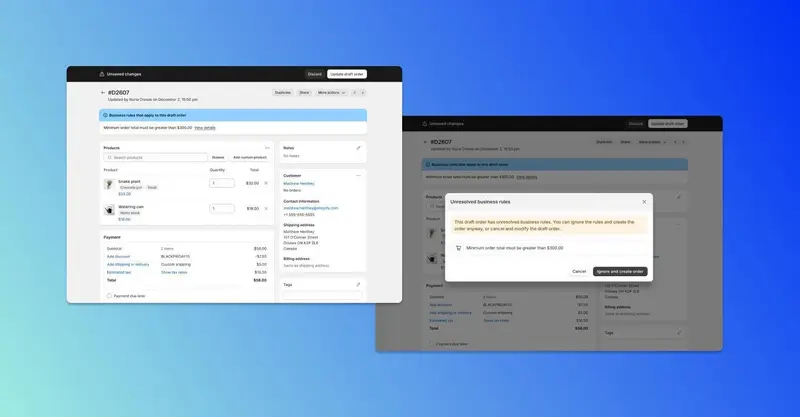
Customizations, validations, and order routing rules created using Shopify Functions are applied to draft orders. For example, displaying specific shipping options based on location, setting minimum order amounts, and hiding specific payment methods.
Checkout customizations created with app blocks are also extended to draft orders. Existing extensions such as loyalty apps and banner messages will now appear in the customer's draft order checkout.
Streamlined B2B order management
This release introduces several improvements to better support B2B merchants with both administrator-created and buyer-initiated draft orders, ensuring a consistent experience for sales staff and customers.
Shopify B2B Plus merchants can set up and collect deposits on draft orders to secure customer commitment without relying on workarounds such as offline payment collection. Deposit collection is particularly useful for large B2B orders of build-to-order items that have not yet been manufactured.
B2B merchants can convert draft orders into actual orders by charging stored credit cards. This feature saves merchants time by allowing them to charge cards without having to convert drafts into actual orders.
For customers, this eliminates the need to reconfirm details during the payment process, resulting in a faster payment experience.
Previously, B2B merchants could only offer fixed or customized bundles if the order did not require review. Now, both types of bundles can be included in orders submitted as drafts.
This gives customers flexibility in how they order, and allows merchants to provide a consistent way to manage bundle sales across all channels.
Pricing reliability and transparency
Merchants have the option to lock product prices in draft orders, ensuring that the quoted price remains unchanged even if catalog prices fluctuate. If prices are not locked, the latest product prices will be automatically reflected.
Price locking can be used to generate stable quotes for large B2B orders, maintain promotional prices during seasonal sales, and secure agreed-upon prices for custom orders. All of this creates a reliable and secure purchasing experience for customers, strengthening the overall merchant-customer relationship.
How to get started now
For more information about specific draft order features, please visit the Help Center or create your first draft order in the admin panel. For the latest features and improvements, please check all Shopify updates in Winter '25 Edition.
Growing the retail business
We bring you exclusive behind-the-scenes stories from merchants, industry trends, and tips for creating outstanding in-store experiences.
POS system suitable for all types of sales



