 跨境独立站开店
Important: Shopify's response to the consumption tax increase - Explanation of how to set up reduced tax rates
Shopify will automatically update the tax rate on October 1st, so merchants do not need to change the sales tax rate from 8% to 10% themselves.

The consumption tax is scheduled to be raised to 10% from October 1, 2019. As a result, your online shop may need to make adjustments such as changing prices. This article will explain what Shopify will do in response to the tax increase and what merchants will need to do.
Shopify's handling of the consumption tax increase.
The default sales tax rate will be changed to 10% on October 1st.*
Shopify will automatically update the tax rate on October 1st, so merchants do not need to change the sales tax rate from 8% to 10% themselves.
*Businesses that have set their current consumption tax rate in Japan to anything other than 8% for any reason will not be automatically overwritten with the consumption tax rate on October 1st. Such businesses are requested to update their rate themselves by going to Settings > Taxes > Japan Edit > National Tax Rate and changing it to 10%.
Price change app released
In preparation for the tax increase on October 1st, we have released an app that allows you to change prices in bulk.
For more details, please see here.
Reduced tax rate
Regarding support for reduced tax rates, this can be handled with the current Shopify features. Please see here for details.
Important information regarding shipments that extend beyond October 1st.
A common point of caution for all merchants is when shipping orders that extend into October 1st. Sellers are required to calculate consumption tax when the asset is transferred, that is, when the goods are shipped. Therefore, even if a customer completes their purchase on September 30th, before the consumption tax increase, if the shipment is delayed until October 1st or later, the 10% consumption tax will be applied to that product.
However, there are also "transitional measures" that allow shipments to be sent with the consumption tax still at 8%.
According to the National Tax Agency...
The text states: "If a business that sells goods by mail order (meaning the sale of goods by presenting the contents of the goods, sales price, and other conditions to an unspecified number of people, and receiving applications for sales contracts by mail, telephone, or other means, and conducting sales in accordance with the presented conditions, excluding sales related to contracts stipulated in the transitional measures concerning tax rates, etc. for books, etc. related to pre-order sales) presents or completes preparations to present the sales price and other conditions before the designated date of 2019 (April 1, 2019), and receives applications before the enforcement date of 2019 (October 1, 2019), and sells the goods after the enforcement date of 2019 in accordance with the presented conditions, the old tax rate (8%) will apply to the sale of those goods (Article 5, Paragraph 3 of the Supplementary Provisions of the Amended Order). However, if the sale of goods is a transfer of assets subject to the reduction, the said transitional measures will not apply (Article 4 of the Supplementary Provisions of the 2016 Amended Order), and the reduced tax rate will apply."
You're probably thinking, "???" Let me explain it in simpler terms.
For products for which the sales price was displayed or preparation for displaying the price was completed before April 1, 2019, the 8% tax rate will apply even if the order was received before October 1, 2019, and the product is shipped on or after October 1, 2019.
In other words, for products whose prices have not changed since before April 1, 2019, the 8% tax rate will apply even if the shipment crosses the October 1st deadline.
So, how do you do this with an online store using Shopify? Below, we'll explain several methods.
First, let's make it known and clearly state it.
Set the products to which the 10% discount will apply in advance.
Due to shipping procedures, some products may be confirmed for October shipment around the latter half of September. In that case, please use Shopify's tax priority setting (instructions here) to set it to 10%. When doing so, please clearly indicate this on the product page or elsewhere.
Some products are not publicly listed, and stores also bear the burden of the tax increase.
Of course, once October shipping is confirmed, we could either make the relevant product private, mark it as out of stock, or continue selling it at the 8% tax rate, with the store bearing the increased tax burden.
Find the method that suits your store and prepare accordingly.
Those who are setting their selling price excluding tax.
Businesses that currently display product prices excluding tax (e.g., displaying 1,000 yen on the product page and adding consumption tax at checkout) do not need to make any changes to their settings regarding this tax increase, as Shopify's consumption tax rate will automatically switch to 10% on October 1st.
However, businesses whose current consumption tax rate in Japan is not 8% will not be automatically overwritten with the consumption tax change that will take effect on October 1st. Such businesses should update their rates themselves by going to Settings > Taxes > Japan > Edit > Country Tax Rate and changing it to 10%.
Those who are setting their sales prices inclusive of tax.
Currently, businesses displaying product prices inclusive of tax (e.g., ¥1,080 (tax included) on the product page) will have Shopify automatically update their sales tax rate to 10% on October 1st (with some exceptions). Because of this automatic update, the tax portion of the inclusive price will increase, while the product price will decrease. Therefore, businesses will need to either absorb the tax increase while keeping product prices the same, or raise prices accordingly. Alternatively, they can switch to displaying prices excluding tax at this time.
We will raise prices to reflect the tax increase.
To make price increases easier due to the tax hike, Shopify is planning to release an app that will automatically change prices in bulk. We will provide updates on the app here as they become available.
Alternatively, you can edit product prices in bulk from the administration panel. Please see here for details.
Switch to external tax
To switch to displaying prices excluding tax when taxes are increased, go to Admin Panel > Settings > Taxes > uncheck "Display products at tax-inclusive prices" and click "Save".
In this case, the price will remain the same as the price set with tax included, so please update the price by using a price adjustment app to lower it.
For those worried about tax increases, regardless of whether they are included or excluded from the price (Password protect your store)
Various unexpected events may occur during a tax increase. One possible countermeasure is to password-protect your store before and after the tax increase, temporarily halting customer orders. Once price changes and other adjustments have settled down, you can then remove the password and reopen the store.
Click here for instructions on how to password-protect your store.
How to set up reduced tax rates
A reduced tax rate system will be introduced from October 1, 2019. As a result, a tax rate of 8% will be applied to food and beverages (excluding alcohol) and newspapers published at least twice a week. For more details on the reduced tax rate, please click here.
In response to this new system, Shopify offers a feature called "tax priority," which allows you to set different tax rates for specific collections.
How to create products eligible for reduced tax rates on Shopify
1. Create a manual collection containing the relevant product.
2. Create tax preferences from tax settings.
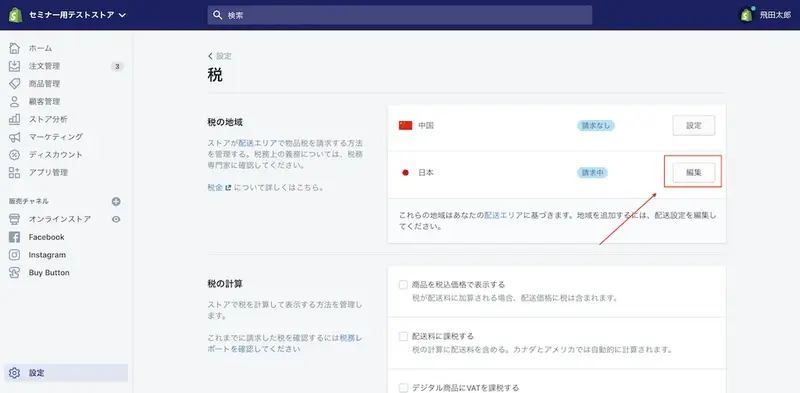
・Go to Admin Panel > Settings > Taxes > Click “Edit” for Japanese Taxes.
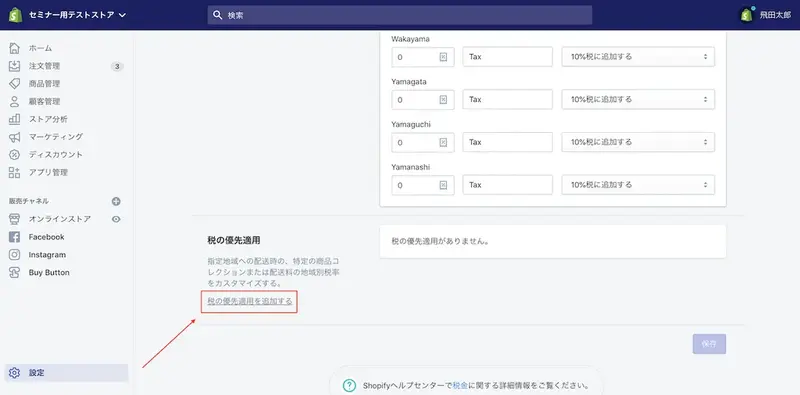
Click "Add tax priority" at the bottom of the page.
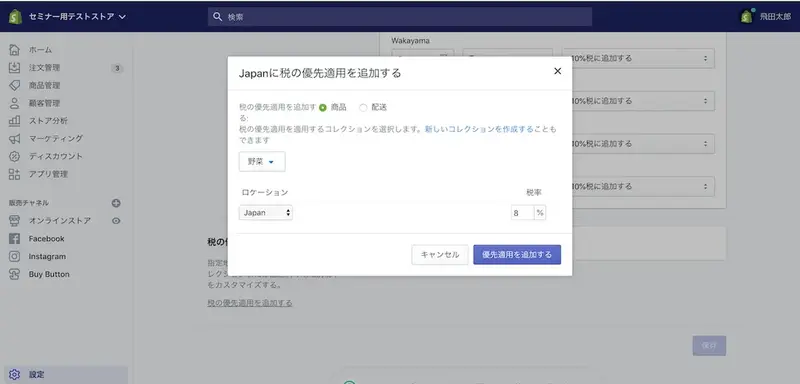
Select the collection for which you want to set a reduced tax rate, select the region to apply it to, "Japan", change the tax rate to "8%", and click "Add preferred application".
4. Completed!
・That's it! Even though the store's base tax rate for Japan is 10%, eligible items (collections) subject to the reduced tax rate will now be displayed as 8%.
If you have any questions regarding this tax increase, please feel free to contact our support team.
Thank you very much for your cooperation.
read more
- Let's start preparing for the transition to displaying total prices.
- What is SEO? Here's what you can do right now with Shopify!
- A must-have guide! Try adding products to your store using a CSV file!
- We're revealing the secrets to integrating Shopify and Facebook!
- You can analyze your online shop's data to this extent!? Master Shopify's store analytics and reports.
- [Easy] How to Write a Receipt: New System and Points to Note (A Summary for Everyone in 5 Minutes)
- Shopify Japan 2020 New Year's Thoughts
- Shopify's Japanese forum is now open!
FAQ
Will Shopify automatically handle the consumption tax increase?
Are there any apps that allow me to change prices in bulk?
How should we handle the reduced tax rate?
Share this article
- Share on Facebook
- Share on X
- Share on LinkedIn



