A comprehensive analysis of Shopify plans and billing: Price, fee differences, and upgrade thresholds.
Shopify Fee Guide for Cross-Border Sellers: Latest monthly and yearly pricing for Basic / Grow / Advanced / Plus, the real difference between payment rates and third-party gateway commissions, upgrade thresholds calculated by GMV, payment method settings, and practical methods to reduce billing.
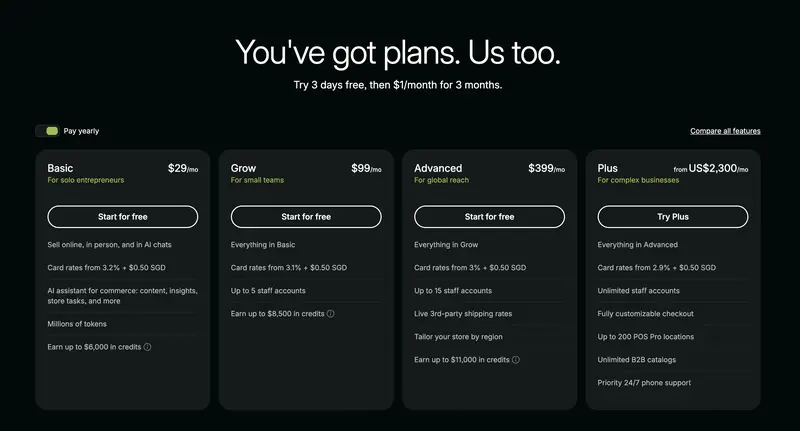
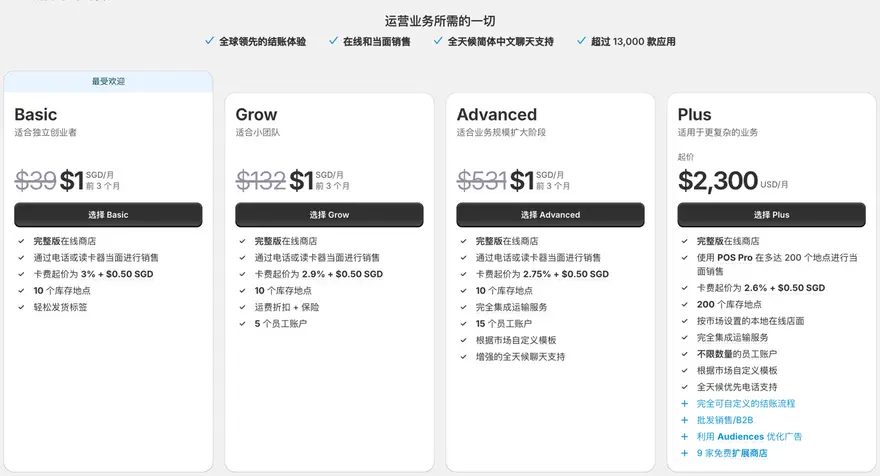
I. 2026 Latest Package Structure (Grow has replaced the original Shopify package)
Shopify now has four tiers: Basic / Grow / Advanced / Plus. The original "Shopify" tier has been renamed Grow, which is why you might not recognize the name if you're looking at tutorials from two or three years ago.
Subscription fee (official price in USD)
Regarding currency and region: Shopify's official website displays prices and currencies according to your region. The screenshot above shows the annual payment view for the Singapore region (SGD 29 / 99 / 399), which is not equivalent to the USD price. When planning your budget, only use the settlement currency and amount in your own backend Settings → Billing; do not use numbers from other people's screenshots as your budget.
One of the most easily overlooked hard limitations: Basic does not have employee accounts.
Basic has 0 employee accounts – only the store owner account, with no additional employee accounts available for allocation. This isn't about "lacking a feature," but rather a difference in operational methods:
1. When using Shopify Payments: Card fees
The two columns are placed together to illustrate one point: the rates are strongly correlated with the region, with only a 0.2 percentage point difference between different plans. The fixed 30¢ rate is the same for all plans and can be ignored when calculating upgrade thresholds.
It depends on your target market for your independent website: which countries and regions, and what payment tools are commonly used there. For a Shopify independent website targeting an English-speaking market, what specific payment tools are used? 1) PayPal: PayPal is an e-wallet, similar to Alipay in China. PayPal is a mainstream payment tool in English-speaking countries. 2) Stripe is a popular credit card payment tool, though its brand recognition seems to be lower than PayPal.
To use PayPal as a payment method for your Shopify website, you must have a business account. Before registering, prepare the following: email address; business license (photo) of your company or sole proprietorship in mainland China; front and back of the legal representative's ID card; proof of address, such as a photo of the front and back of the legal representative's ID card or proof of office address. Here's how: How do I link my PayPal business account to my Shopify admin panel to receive payments?
Mainland sellers typically register Stripe accounts in Hong Kong or the United States. Since the application process for Stripe is generally the same across countries, I'll first briefly compare Hong Kong and US Stripe accounts, then focus on the registration process for a Hong Kong company account, and finally discuss some important points to note when using Stripe. Hong Kong Personal Stripe Account Registration Process (HK ID Required), Hong Kong Company
This article shares information about Payoneer, including what it is, how it receives sales payments from popular cross-border e-commerce platforms like Amazon and Lazada, its target audience for affiliate marketing platforms, common registration questions, and the registration process for personal and company accounts.
 跨境独立站开店