跨境独立站开店
Store operations | Shopify AI Toolkit User Guide
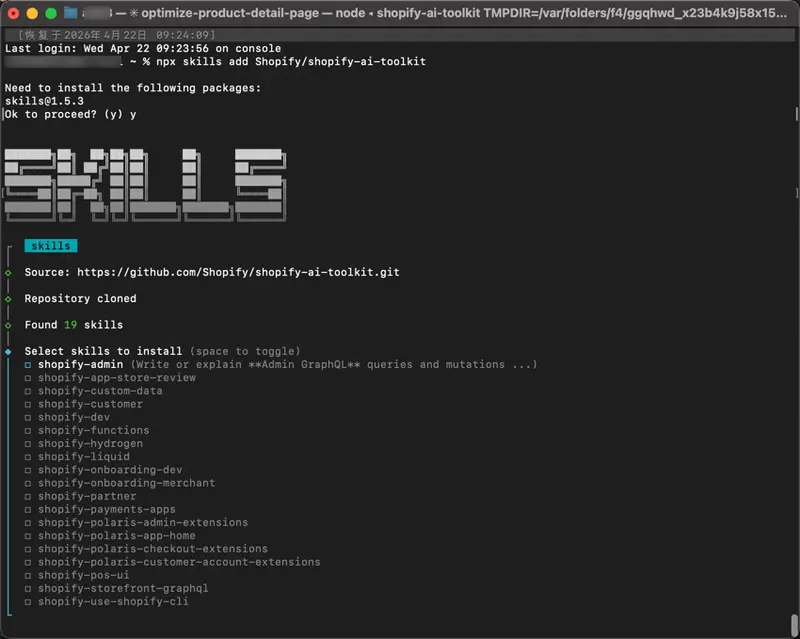
This article introduces how to install Shopify's official AI Toolkit and its practical applications, helping developers use AI tools more efficiently in theme development, bulk SEO optimization, product data processing, and application development.
I. What problems does the Toolkit solve?
The official statement: Enable agents to work correctly with Shopify, rather than guessing implementation details. (See the Shopify AI Toolkit documentation.)
Second, don't overhype it: it's more like an "engineering assistant with Shopify documentation."
Many articles introducing AI Toolkits emphasize how quickly they can "complete theme creation, SEO optimization, and batch modifications in minutes." This direction is correct, but in actual projects, a slightly more nuanced approach is needed.
III. Pre-installation Requirements
Supported AI tools include: Claude Code, Codex (Skills and MCP only), Cursor, Gemini CLI, and Visual Studio Code.
IV. Overview of the Three Installation Methods
The following sections explain the key points in different ways; the command and menu locations are based on your local documentation version. If they differ from the official documentation, please refer to shopify.dev AI Toolkit.