跨境独立站开店
What is a Shopify collaborator account?
If you're a Shopify partner, you've probably set up a development store. A development store is a free Shopify account where you can build stores for clients and try out new themes and apps. It's an important component of Shopify building and provides many opportunities to learn about the platform's capabilities.
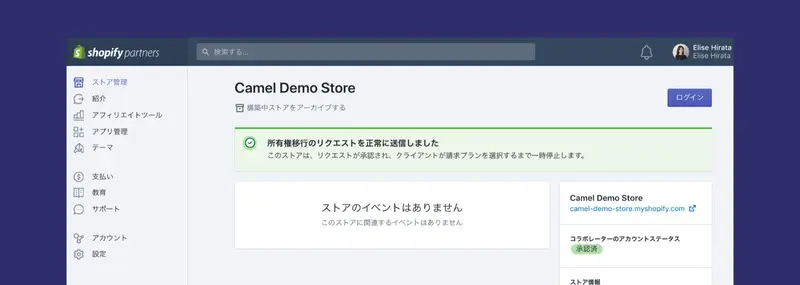
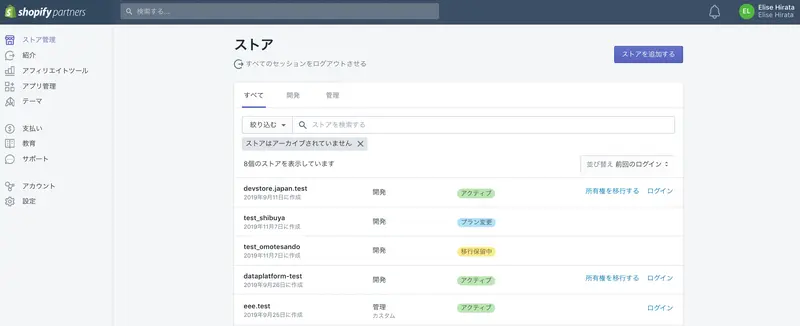
If you're a Shopify partner, you've probably set up a development store. A development store is a free Shopify account where you can build stores for clients and try out new themes and apps. It's an important component of Shopify building and provides many opportunities to learn about the platform's capabilities.
But what if the client already has a Shopify store? You might be hired to redesign the look of their existing store, or you might participate to propose new marketing ideas. In those cases, you use a collaborator account.
This article explains what a collaborator account is, how to access a client's store, and how to use this account to improve the client's experience.
What is a collaborator account?
Before the introduction of collaborator accounts in 2017, if you wanted to work on a client's project, you had to be registered as a staff member on their store. This wasn't ideal. Staff accounts depended on the plan the business chose. Also, if you were working on multiple stores, you had to track all the different logins.
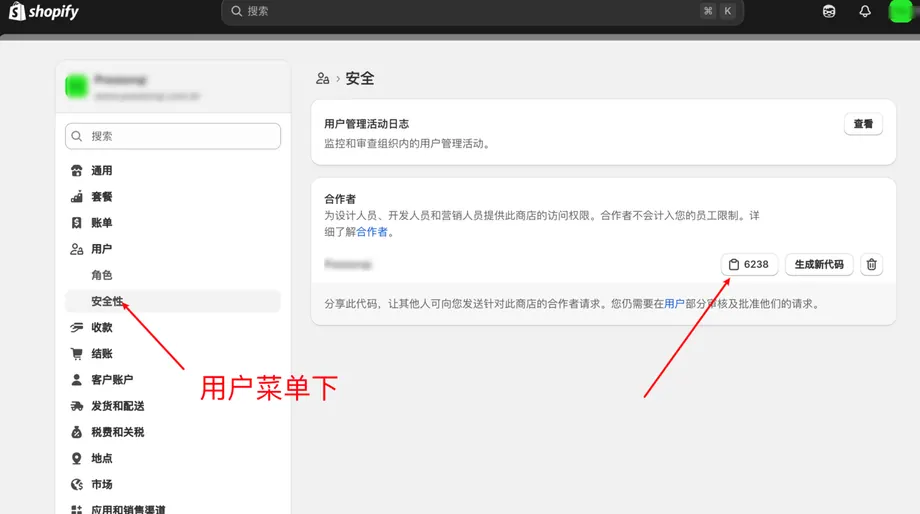
A collaborator account is the solution. All you have to do is send an access request to your client's store directly from your partner dashboard. The store owner will receive the request via email and approve the partial permissions required for your work. Then you can start your work.
"All management stores can be accessed from the partner dashboard. You don't need to remember multiple different login IDs and passwords."
Your admin store is all accessible from the Partner Dashboard. You no longer need to remember multiple different logins. And because collaborator accounts are not counted as business staff, you can ensure the flexibility for clients to have you join them whenever they need you.
Apply to be a collaborator
Requesting access to the client store is quite simple.
- Click "Store Management" on the Partner Dashboard.
- Click "Add Store".
- When choosing the store type, select "Managed Store".
- Enter the store's URL.
- In the "Permissions" section, select the permission items you want to access, or select "Full Access." Remember that the store owner can change these permissions after your account is created. More details about permissions will be provided later.
- If you would like to add a message, please write it in the "Add a message" field.
- Click "Save".
Once your request is submitted, the store owner will receive an email requesting approval, and a notification will also appear on the Shopify home screen. Requests expire after 7 days, but don't worry, you can submit another request after the expiration date.
Once your client approves your request, you will gain access to the store. All the stores you are working on can be accessed from the store page in your partner dashboard.
Deleting the management store
Once you've completed your work with the client, they can remove your account from the store. You can also remove collaborator accounts from your end. Go to the store management page, select the name of the store you want to remove, and click "Remove managed store."
Deleting the management store also helps maintain security on the client provider's side.
Request permission
The type of permission you request will vary greatly depending on the work you will be doing for the client. For example, if you are responsible for designing a store, you probably won't need access to the store's finances. Instead, you will likely need access to the following items:
- menu
- Blog posts and pages
Carefully explaining to the client why they need access to specific items in the store helps build trust. It will lead to the client gaining a multifaceted understanding of the work you're doing.
Smooth working environment
Collaborator accounts make the process of working with existing Shopify businesses incredibly smooth. You easily gain access to the parts of their entire store that you need for your work, while providing businesses with a secure management system. This collaborative environment gives you the opportunity to do amazing work with client businesses everywhere.
Grow your business with the Shopify Partner Program. Whether you offer marketing, customization, web design, or development services, the Shopify Partner Program will guide you to success. Joining the program is free, offers revenue-sharing opportunities, and provides access to a wealth of tools to grow your business. Join our passionate commerce community today!
read more
- Attention all aspiring online shop owners! Here are 7 essential steps to starting your own business!
- This guide explains how to set up and specify a domain name for your online shop.
- [Must-Read Guide] Introducing Payment Services You Can Use with Shopify
- 30 Stylish E-commerce Sites Built with Shopify, Selected by Designers
- An overview of Shopify's template language, Liquid.
- Three steps to set up a local Shopify theme development environment
- Creating your first Shopify theme section
- Ship&co makes domestic and international shipping easy!
- Explanation of Shopify Partner Program Terms and Conditions and Requests
- To ensure trust and quality on the Shopify app store
FAQ
What is the difference between a Shopify development store and a managed store?
What is a Shopify collaborator account?
How do I apply to become a collaborator?
- In the "Permissions" section, select the permission items you want to access.
Share this article
- Share on Facebook
- Share on X
- Share on LinkedIn