跨境独立站开店
How to create a customizable brand logo section
Clients often want to highlight their business partners to showcase their credibility and high demand. The easiest and most effective way to achieve this is to include a section on their website displaying their business partners' brand logos. In a previous blog post on web design development, we discussed the benefits of social proof. "Of the many forms of social proof, the most immediate and effective is incorporating brand logos into e-commerce page designs." A well-placed and visually appealing logo section conveys a sophisticated and trustworthy impression, expressing the brand story more through images than text. Logo sections can also be used on developer portfolio sites, as they visually represent the services offered, much like a logo. Theme developer Maestrooo has used this technique to showcase multiple development services, resulting in a highly effective site.
Clients often want to highlight their business partners to showcase their credibility and high demand. The easiest and most effective way to achieve this is to include a section on their website displaying their business partners' brand logos. In a previous blog post on web design development, we discussed the benefits of social proof. "Of the many forms of social proof, the most immediate and effective is incorporating brand logos into e-commerce page designs." A well-placed and visually appealing logo section conveys a sophisticated and trustworthy impression, expressing the brand story more through images than text. Logo sections can also be used on developer portfolio sites, as they visually represent the services offered, much like a logo. Theme developer Maestrooo has used this technique to showcase multiple development services, resulting in a highly effective site.
This article explains how to build a dynamic logo section using Liquid to extend the functionality of your custom theme and differentiate your client work. We'll also explore how to leverage Liquid's section settings to create customizable options, allowing clients to personalize their online stores. Get the free "Learn Liquid: Get Started with Shopify Theme Development" guide to learn practical tips, tricks, and techniques to begin developing and improving your Shopify themes.
Creating a custom logo section
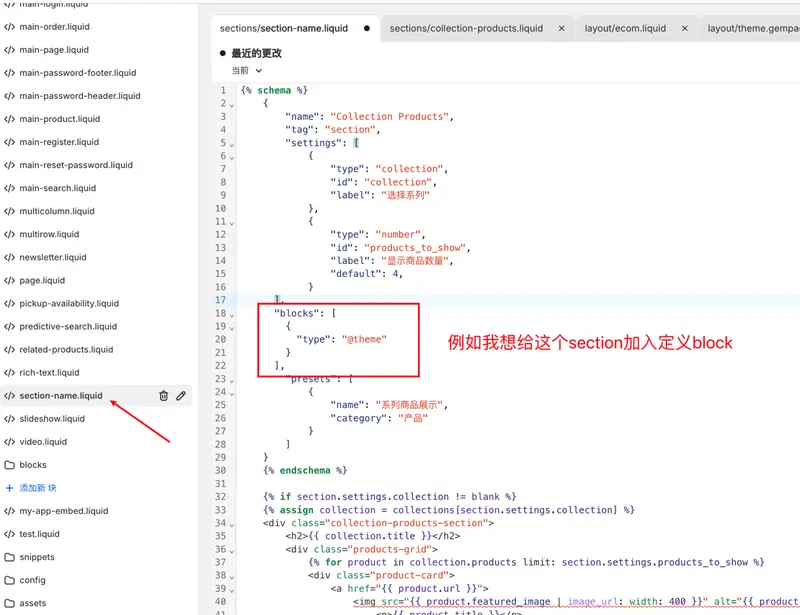
Here, we'll go through how to create a logo section step by step. 1. Deciding on the types of elements to include in the section The first step is deciding what types of elements you want to include in the section. Depending on the client's requirements, this may include text, headings, and other input settings. In this example, we want to include a section heading and a hyperlink to the logo image. We will use a Liquid section object to create embedded settings for text, link URL, and display image that can be accessed and modified from the theme editor. Creating the heading text is simple and shows how to link a Liquid object to the section settings. For example, you can write the following markdown:
Here, we are using a section object to create a property with the ID "title". By creating settings within the section's schema tag, we can refer to this ID and assign specific properties. In this case, we want it to be a text box, so the type to assign is "text". Setting these in the schema array would look like this:
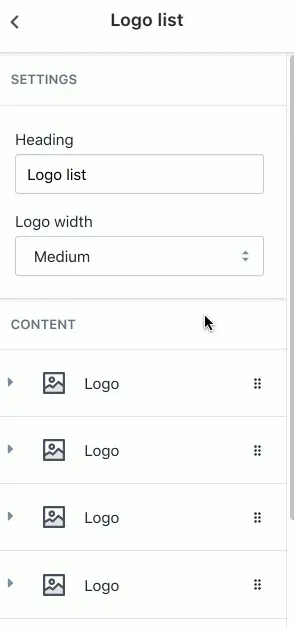
*The latest version of the free Shopify theme "Debut" already includes a logo list section.
Connection to the logo
A well-placed, eye-catching logo highlights the diverse brands a client has worked with and boosts conversions through the benefits of social media. As we've seen above, leveraging the themes section allows clients to customize and create an intuitive logo section. If you're creating a logo for a client, Hatchful is a highly recommended and practical logo generator. Hatchful is a Shopify-based mobile app for iOS and Android that lets you create a visual identity from scratch in the palm of your hand. You can customize brand colors and fonts and download brand assets that clients need, such as aspect ratio images for social media. Whatever you choose to do with your custom theme logo section, it will undoubtedly be a powerful tool in connecting your brand with customers. Leverage your logo section to add value for your clients. We hope this guide has been helpful.
read more
- Designing an online shop that sells
- [How to Use Shopify] Opening an Online Store: Basic Setup
- Features of the mobile-first, highly flexible Shopify theme "Dawn"
- This guide explains how to set up and specify a domain name for your online shop.
- Headless Commerce for Beginners: Should Online Shops Go Headless?
- A must-have guide! Try adding products to your store using a CSV file!
- Creating your first Shopify theme section
- Why infographics are essential for content marketing
- How to improve custom search on your Shopify storefront
Grow your business with the Shopify Partner Program. Whether you offer marketing, customization, web design, or development services, the Shopify Partner Program will guide you to success. Joining the program is free, offers revenue-sharing opportunities, and provides access to a wealth of tools to grow your business. Join our passionate commerce community today!
Share this article
- Share on Facebook
- Share on X
- Share on LinkedIn