 跨境独立站开店
Points that online shops should be aware of when updating to iOS 14
With the iOS 14 update, iOS apps will be required to ask users beforehand whether they want to allow cross-app and cross-website tracking. This could have a significant impact if your business relies heavily on digital advertising or if you develop apps for iPhones and iPads. This article will provide information to help you respond appropriately to this policy change.

With the iOS 14 update, iOS apps will be required to ask users beforehand whether they want to allow cross-app and cross-website tracking. This could have a significant impact if your business relies heavily on digital advertising or if you develop apps for iPhones and iPads. This article will provide information to help you respond appropriately to this policy change.
Have you heard rumors that the iOS 14 update will affect personalized advertising on social media? This update will require iOS apps to ask users beforehand whether they want to allow cross-app and cross-website tracking. Previously, users were opted in by default.
Given the widespread use of iOS devices, this policy change could impact your business's strategy for maximizing reach to your iOS audience. This is especially true if you rely heavily on digital advertising or develop apps for iPhones and iPads.
Of course, we'll have to wait and see what the exact impact will be, and the actual opt-in rate will likely vary from business to business. Nevertheless, we wanted to compile some information that will help us respond appropriately to this policy change.
Things to be aware of when updating to iOS 14
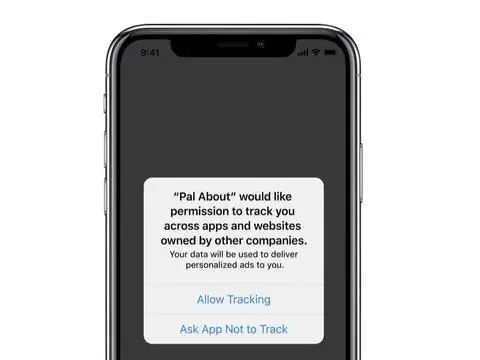
This update is scheduled to be rolled out in Spring 2021, but if you're using an iPhone, you may have already experienced pop-ups like the one below in some apps.
A pop-up will appear in the following cases:
- An app that shares customer information with other companies for marketing and advertising monetization purposes.
- Apps that use customer information obtained from other companies (such as advertising platforms)
For example, if you run a retargeting campaign on Facebook targeting all customers who viewed a specific product collection in your iOS app, you can only target customers who have enabled "Allow Tracking" in both your iOS app and the Facebook app.
This change will affect all platforms that collect data for personalized advertising. This article focuses on Facebook ads because Facebook has the largest reach and stable targeting options, and you may be quite reliant on it for your online advertising.
What are the implications for business?
If your business offers an app that shares customer information with third parties for marketing purposes, you will need to implement the data privacy pop-up mentioned above to comply with Apple's policies. For more information, please visit Apple's developer site.
Even if your business doesn't use mobile apps, if you allocate a digital advertising budget to iOS devices, you may be affected by these changes. If some users don't consent to receiving personalized ads or being tracked from advertising platforms such as Facebook, Instagram, Snapchat, and Pinterest (but not limited to these), you won't be able to retarget them through those apps. This means users of those apps are more likely to receive less relevant ads.
These changes will not affect access to the online store via Android devices or regular browsers. Therefore, depending on the opt-in rate, even if direct targeting opportunities to iOS app users decrease, it will still be possible to reach a large portion of the remaining audience.
The following impacts are anticipated on prospects and retargeting campaigns:
- Prospect campaigns: Since a certain number of iOS users are likely to opt out of tracking, advertising costs for targeted campaigns targeting high-potential customers will naturally become less efficient. As a result, performance will vary depending on your current targeting options.
- Retargeting Campaigns: If users do not consent to personalized ads, it will be difficult to retarget iOS 14 users based on their behavior on your app or website. This will also reduce the overall size of your retargeting audience, which previously relied on in-app tracking.
We recommend that you review how your data is being used on each platform where your ads are running, and understand what changes may be necessary for iOS 14.
If you, like many Shopify merchants, rely heavily on Facebook and Instagram ads, here are some specific changes you should be aware of and actions Facebook recommends:
- Going forward, the number of conversion events you can use for optimization will be limited to eight per domain. If you are currently using more than eight events, you will need to prioritize your top eight in Facebook Business Manager.
- Domains with pixel events shared across multiple Facebook Business Manager accounts require verification in the appropriate Business Manager account. Domain verification determines which Business Manager account has permission to configure the settings and prioritize the eight conversion events. See here for instructions on how to perform domain verification.
- The 28-day click-through, 28-day view-through, and 7-day view-through attribution windows will no longer be supported. The new default will be a 7-day click-through, and attribution windows will be set at the ad set level instead of the account level.
Facebook's Business Help Center has a complete list of recommendations. Google, Snapchat, and other advertising platforms also have their own help centers with guidance.
Tip: Shopify's Facebook channel lets you manage your marketing activities and sales on your Facebook property in a unified way. Once you've obtained all the necessary consent from your customers, you can use this channel to customize how much information you share with Facebook and optimize your advertising costs for Android, web, and iOS traffic.
Install Facebook
How do I comply with Apple's new privacy policy?
The following actions will help you optimize your overall digital marketing while complying with the new privacy policy and making the most of your advertising budget.
- Carefully monitor the return on advertising spend (ROAS) and ensure that you allocate your budget appropriately for each campaign.
- If you are using an iOS app that shares customer information with third parties for marketing or advertising monetization purposes, enable the "App Tracking Transparency" pop-up so that users can review their tracking data before it is shared with other companies.
- Let's diversify our approach by trying out new social platforms, for example.
- We will consider increasing our investment in organic marketing channels such as SEO, which are not affected by this policy change.
- Offer visitors incentives to encourage them to switch from paid channels to your email list. This allows you to remarket to them via email without using retargeting ads.
- When acquiring customers, consider using a last-click attribution model and tracking campaign performance with a focus on UTM parameters in reporting tools other than Ads Manager, such as Google Analytics.
Get ready for the iOS 14 update.
If your business relies heavily on digital advertising, the best course of action is to consider the points mentioned above and gather information as updates are released. We will continue to monitor development progress and provide updates on our blog.
Original text by Josh Davey, translated by Nozomi Fukatsu
Share this article
- Share on Facebook
- Share on X
- Share on LinkedIn



