 跨境独立站开店
A guide to Instagram affiliate marketing
This guide compiles all the information a beginner needs to start affiliate marketing on Instagram, from how affiliate marketing works to success stories.






What is Instagram affiliate marketing?
Instagram affiliate marketing is a marketing business where you earn advertising revenue by promoting products and services through posts on Instagram. Instagram affiliate commissions are earned as a performance-based fee when a product or service is purchased or subscribed to through a dedicated link shared on Instagram. For affiliates (posters), the ease of earning income simply by posting links is a major attraction.
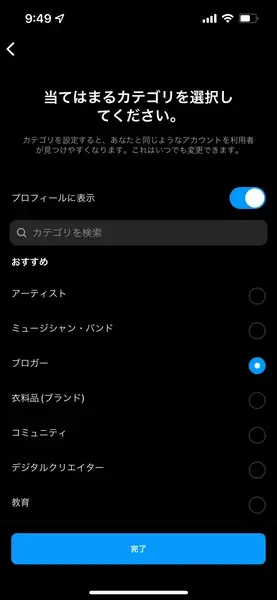
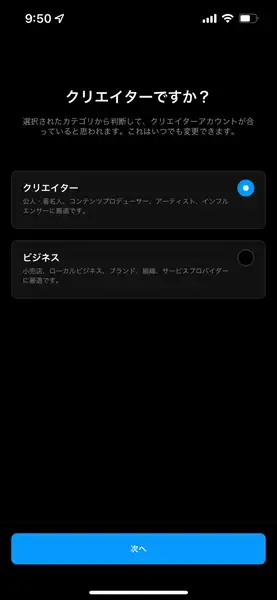
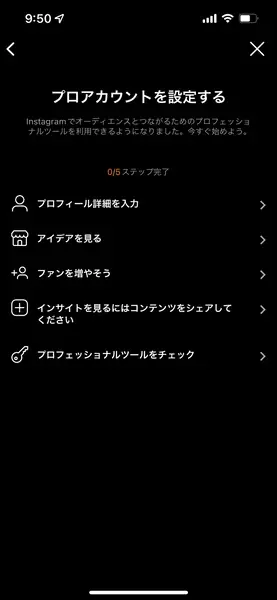
1. Switch to a Pro account
While you can do affiliate marketing with a regular personal account, we recommend switching to a "Pro Account" to access features that enhance affiliate performance, such as data analysis of post views and clicks, and advertising.
2. Register with an ASP (Affiliate Service Provider).
Once you've set up your Instagram professional account, register with an Affiliate Service Provider (ASP) that handles affiliate programs. Instagram doesn't handle affiliate programs directly, so you'll need to register with an ASP to access their affiliate program and obtain your links.
3. Select the products/advertisements to showcase.
Once your affiliate registration is complete, you'll select the products and advertisements you want to promote. Search for offers by category or keyword, and choose offers that match the concept of your account.


