 跨境独立站开店
How to write prompts for image generation AI
Image generation AI is constantly evolving. Learn how to write prompts in this article and use AI to create images tailored to your needs.

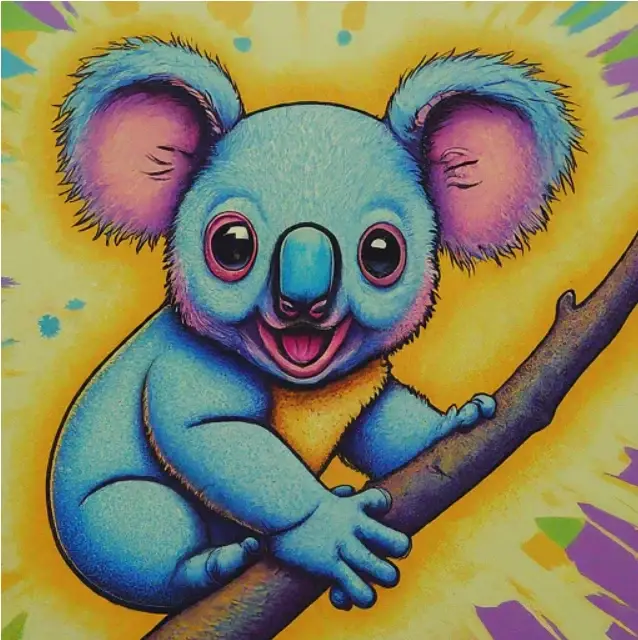
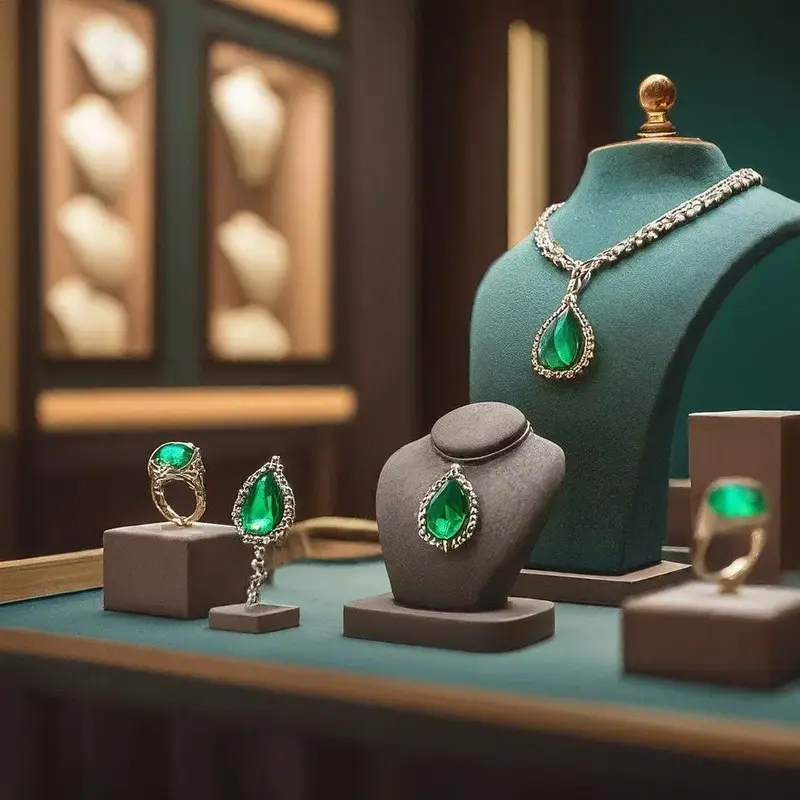
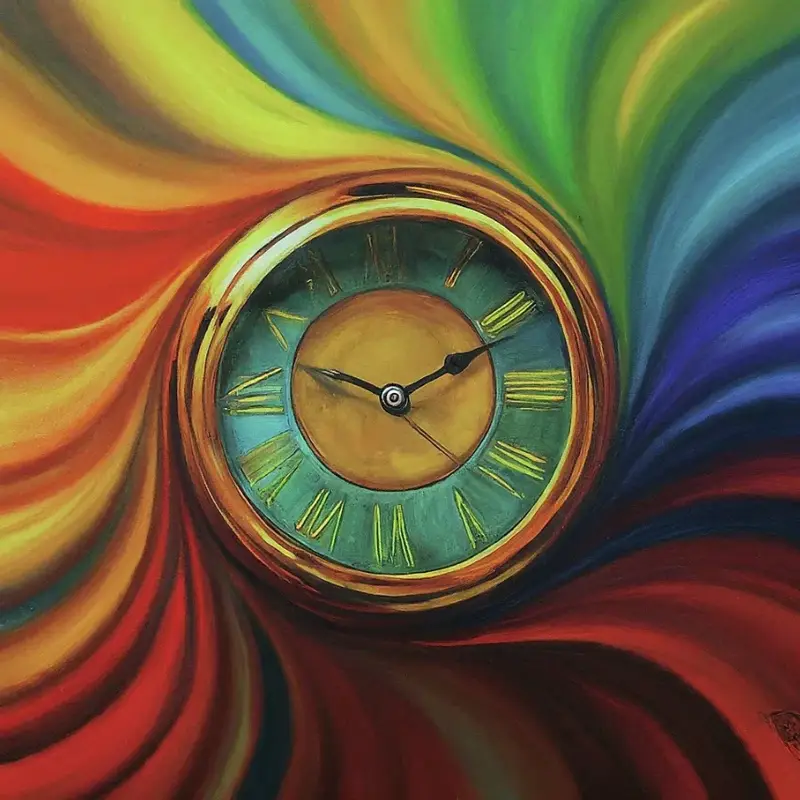
Image generation AI is constantly evolving. Learn how to write prompts in this article and use AI to create images tailored to your needs.
The advent of AI has dramatically streamlined a wide range of tasks. Its applications are diverse, from creating impressive resumes and writing software code to brainstorming novel ideas. And now, with the emergence of image generation AI, this technology can be applied to art production as well.
Using image generation AI, you can simply enter a text prompt such as "an oil painting depicting an Impressionistic mountain range," and within seconds, the AI will generate a digital artwork that matches your description.
At first glance, generating AI images might seem to require almost no skills. You simply input what you want to see, and then let the software generate the AI image.
However, to get the best results, it's wise to approach it a little strategically. That is, you need to learn how to write prompts for image generation AI that most accurately capture your intentions.
How AI generates images
Image generation AI is an AI tool that uses algorithms to create images that resemble paintings, photographs, and other visual arts. Because it is trained on a vast image database, it can associate prompt words such as "Impressionism" with reproducible art styles.
These systems can generate new images or edit and transform existing works based on prompts. In most cases, these generative AI tools operate on machine learning. Popular AI image generation tools include Midjourney, DALL-E, Stable Diffusion, and Gemini.
Shopify Sidekick
Shopify Sidekick makes starting, running, and growing your business easier than ever. Its groundbreaking commerce-focused AI empowers entrepreneurs to be more creative, productive, and successful than ever before.
How to configure prompts for image generation AI
- Subject or scene
- Artistic style or influence
- Detailed description
- Mood and emotions
- Color Palette
Excellent image generation AI prompts tend to include multiple descriptions. The more you write, the more likely the AI tool is to generate the art you want. The elements you should include in your AI prompt are as follows:
First, define the main theme or scene, and then add all the details you have in mind. For example, you could enter the following:
- "A person wearing a gray suit walking through a futuristic cityscape."
- "A scene of a rough sea on a rainy day"
- "Portrait of an elderly woman sitting at a kitchen table and smiling."
Specify the art form, style, or movement you want the AI to imitate. For example:
- "Abstract painting in the style of Jackson Pollock"
- "Monet-style pencil sketches"
- "Romantic-style watercolor painting"
This describes specific features such as textures, layers, and lighting. For example, it might look like this:
- "A man's face partially obscured by the leaves of a tree branch."
- "A farmhouse illuminated by the morning sun"
- "Thin clouds floating in a pale blue sky, depicted with thick brushstrokes."
You can support the AI model by indicating the mood and emotional tone you want to express in your work. Possible prompts include the following:
- "Creepy and ghostly"
- "Gloomy"
- "Bright and cheerful"
You can specify compositional elements such as the aspect ratio, angle, and viewpoint of the image. For example, like this:
- "Bird's-eye view"
- "12:16 aspect ratio"
- "The bottom third fades out to gray."
You can also prompt the AI to render an image in a specific color. For example, you can enter the following:
- "A palette of yellow, orange, and brown"
- "Black and white cinematic lighting"
- "Beige tones"
Tips for using AI image prompts
- Give clear and detailed instructions.
- Specify the art style in detail.
- Use verbs that express actions.
- Incorporate negative prompts.
- Giving AI tools creative freedom
Given the capabilities of AI image generation tools, you might feel a little overwhelmed the first time you use them. Creating specific prompts simplifies the image generation process, allowing you to quickly get what you're looking for.
Furthermore, you won't need to repeatedly revise your instructions. Here are some tips for writing effective prompts for image generation AI.
Write prompts for the image generation AI that clearly define the subject, setting, and style of the artwork you want to create. Avoid vague descriptions and provide specific details about everything, from clothing to color scheme and lighting. This will help you receive an image that closely matches your vision.
To shape the overall look and feel of the artwork, refer to specific art styles or techniques. You could reference a particular art movement like "Abstract Expressionism," or offer general aesthetic guidelines like "Minimalist style." You could also create prompts that name specific artists.
Words that convey movement can add flair to digital paintings and illustrations. AI image generation tools can apply words like "sprint," "reflect," and "glow" to the entire image, ultimately producing dynamic, captivating, and unique results.
One way to create an effective prompt is to tell the AI tool what you don't want it to see. For example, a text prompt might look like this: "Underwater scenes, but without submarines or other human technology."
While you may have a perfectly formed ideal image in your mind, giving AI creative freedom can sometimes yield unexpected results. These might stimulate the creative process and generate new ideas.
If you're open to developing images in a new direction, it's best to specify essential instructions while keeping the details minimal.
Examples of prompts in image generation AI
Are you struggling to organize your prompts? Here are three examples of effective prompts for image generation AI.
"Create an image of a smiling koala in a pop art style."
This prompt specifies the subject, clarifies the art style, and provides the crucial detail of "smiling." This level of specificity helps the AI tool generate the correct image in one go. After seeing the machine's output, you might want to add further instructions regarding details such as the color palette.
"Create a photorealistic image of an emerald necklace in a display case at a luxury jewelry store."
This prompt specifies the style (you want a realistic image), subject, and scene. Each additional detail is, so to speak, a step back. The most important object is presented first (the necklace), followed by additional information about the immediate and further surroundings.
"Create a colorful visualization of time passing."
You can also use image generation AI to transform abstract ideas into visuals. This prompt intentionally avoids specific nouns and literal verbs, giving the generation tool a creative license to interpret the text. If you don't like the result, you can always refine the prompt with additional specificity.
Frequently Asked Questions about Image Generation AI Prompts
How to create superior AI images?
To create excellent AI images, it's essential to provide clear and descriptive prompts specifying the subject, style, and key details, while also giving the AI creative freedom to generate unique and compelling results.
How can AI images be used in business?
In business, AI-generated images can be used in marketing materials, product designs, logos, and website images. The advantages of AI-generated images in business include cost-effectiveness and near-instant customization.
What are some recommended free AI image generators?
Highly-rated image generation AIs include ImagineArt, Stable Diffusion, and Magic Studio AI Art Generator. However, it's important to note that many well-known image generation AIs, such as Dall-E 3, require a paid subscription.
Share this article
- Share on Facebook
- Share on X
- Share on LinkedIn



