跨境独立站开店
New users can easily integrate with Shopify! Learn how to connect with the online payment service 'Paidy'. New user campaign running until July 31st!
Paidy eliminates the hassle often associated with payment processing and can have a positive impact on your business. This time, we'll introduce how to integrate it with Shopify.

Paidy eliminates the hassle often associated with payment processing and can have a positive impact on your business. This time, we'll introduce how to integrate it with Shopify.
Paidy eliminates the hassle often associated with payment processing and can have a positive impact on your business. This time, we'll introduce how to integrate it with Shopify. For more information about Paidy, click here.
To use Paidy with Shopify, you need to complete the setup process beforehand by submitting the Paidy application form. If you haven't done so yet, please complete the setup process using the button below.
Please be sure to set "Shopify" as the "Cart System" in the application form. Additionally, the merchant review process requires you to have a "Disclosure Based on the Act on Specified Commercial Transactions" and a "Privacy Policy (including the provision of personal information to third parties)" page.
Please check if the required information is included before applying. (*After application, the merchant review process takes approximately 10-14 days.)
For more information on the types and features of online payment methods, please refer to our "Online Payment Guide."
The Complete Guide to Online Payments: Types, Fees, Major Services, and How to Choose
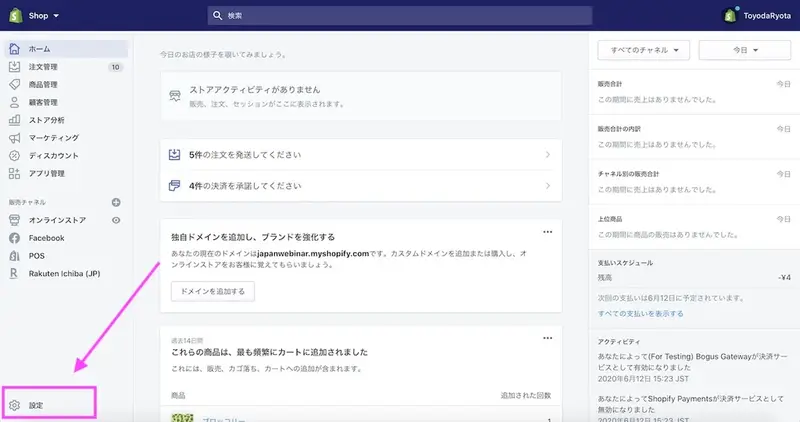
Step 1
From the administration screen, click "Settings" in the lower left corner of the screen.
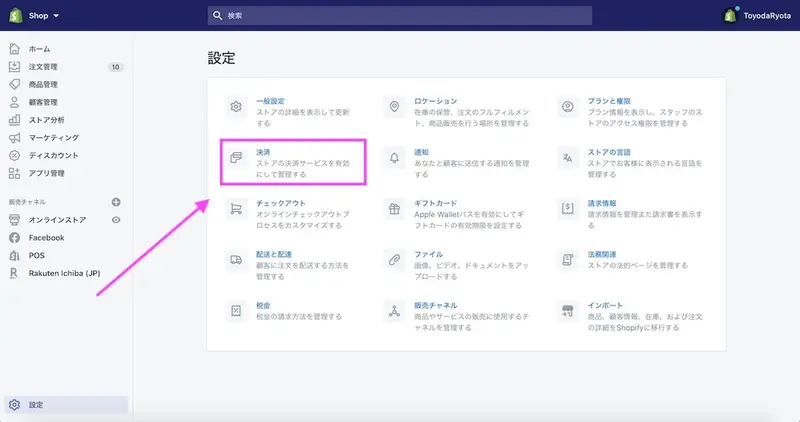
Step 2
Click "Payment".
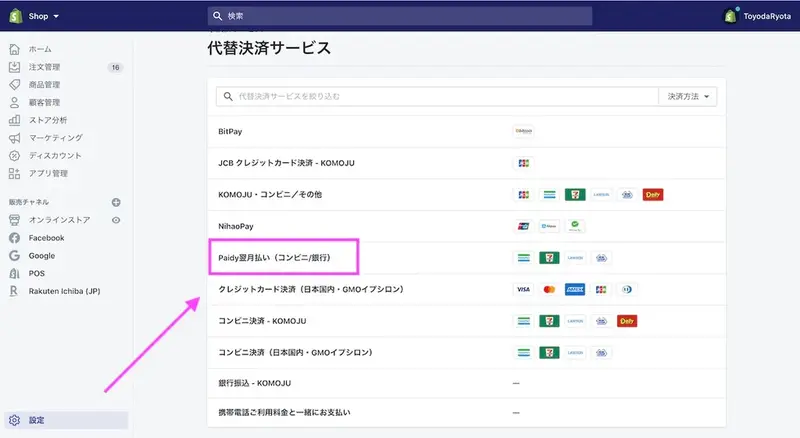
Step 3
From the "Alternative Payment Methods," select "Paidy Next Month Payment (Convenience Store/Bank)."
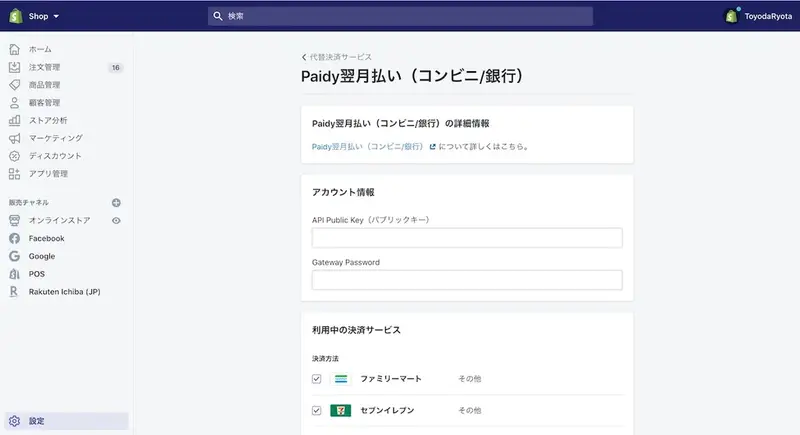
Enter your "Public Key" in the [API Public Key] field and your "Gateway Password" in the [Gateway Password] field. For more details on settings and operations, please refer to this page.
Step 4
Click "Activate Paidy next-month payment (convenience store/bank)".
Partner with Paidy to expand your customer base and boost sales!
That concludes our explanation of how to integrate Paidy with Shopify.
[Download Materials] If you're looking to explore payment strategies that drive sales, Paidy, when integrated with Shopify, offers a relatively smooth implementation and operation process, and you can expect improved conversion rates through a wider range of payment options. Furthermore, Shopify Plus supports advanced payment settings, integration with external systems, and business process automation, allowing for flexible support of larger-scale e-commerce operations. If you're thinking, "I want to implement Paidy on Shopify," "I want to build the optimal payment environment," or "I want to explore payment strategies that drive sales," please take advantage of our free consultation and downloadable materials.
For more detailed information on how to implement payment services, please also refer to our "Online Payment Implementation Guide."
The Complete Guide to Implementing Online Payment Systems | Thorough Explanation of Preparation, Application, Review, and Initial Setup
New customer campaign underway. Integrate Paidy payments into your website.
[Until July 31st!!] Paidy New User Campaign
If you apply for "Paidy Next Month Payment" within the campaign period and meet the campaign conditions, you can enjoy 0% transaction fees for up to 3 months!
Read more: What is Tap to Pay? A summary of how it works and how to use it.
This is a new opportunity to grow your business. Please feel free to apply!
Click here for details on our new customer campaign.
If you want to compare payment methods to find the best fit for your company, we also recommend our "EC Payment Method Comparison Guide."
E-commerce Payment Method Comparison Guide | A Thorough Explanation of Types, Usage Rates, Fees, and How to Choose the Right Combination
Let's open an online shop!
Share this article
- Share on Facebook
- Share on X
- Share on LinkedIn