跨境独立站开店
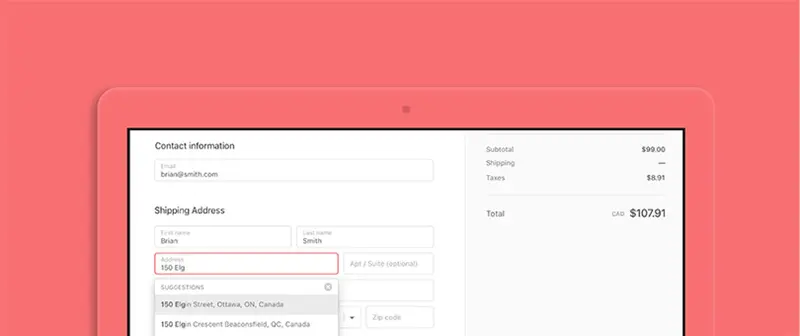
Google Autofill for Shopify: Reduce checkout hassle and increase sales.
Using Google Autofill in address forms allows customers to check out quickly and easily. This feature will soon be available on Shopify. Every store puts a lot of effort into making the shopping experience enjoyable for customers, but multiple input fields during the checkout process can be cumbersome and may even cause customers to abandon their purchase. This is especially true when customers are shopping on their smartphones, as they are more prone to making mistakes on small screens, and correcting them takes time. To help improve the customer experience and increase conversion rates, Shopify will soon be introducing Google Autofill at no additional cost. This feature will be automatically enabled for all stores soon.
Points to check
Every store puts a lot of effort into making the shopping experience enjoyable for its customers, but multiple input fields during the checkout process can stump customers or even cause them to abandon their purchase. This is even more pronounced when customers are shopping on their smartphones, as they are more prone to making mistakes on small screens, and correcting those mistakes takes time.
Decisions made during operation
To help improve customer experience and boost conversion rates, Shopify will soon be introducing Google Autofill at no additional cost. This feature will be automatically enabled for each store shortly.
Pre-implementation check
As customers proceed to checkout and enter the first few letters of their address, Google Autofill instantly fills in the address automatically, virtually eliminating the need for input errors or re-entry.