Testing a Shopify product CSV with one multi-variant item
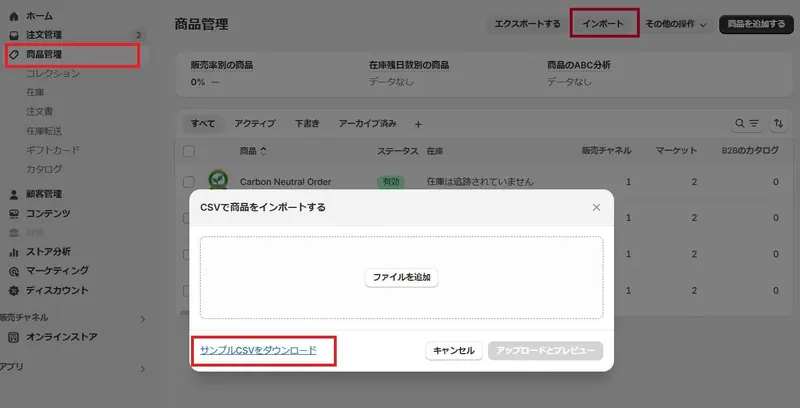
A product CSV lets an editor review variants, prices and images offline. A small export from the current store provides a practical starting structure for the next import.
A product CSV lets an editor review variants, prices and images offline. A small export from the current store provides a practical starting structure for the next import.
Export one item with several variants and images, keeping the original intact. In a copy, change one description and check headings, product identifiers and the relationship between rows for variants and images.
Import the small sample and record the outcome. Check product count, variant count and photos before proceeding. Verify how matching identifiers and blank cells affect existing data before a larger update.
A studio photograph can make three sizes of a pet bed look identical. An early Size Link example translated the measured length, width and height into a box that a shopper could view on a phone.
A collection card often displays a single image. Choose a lead photo that identifies the item before adding alternative angles, a size reference and any demonstration media.
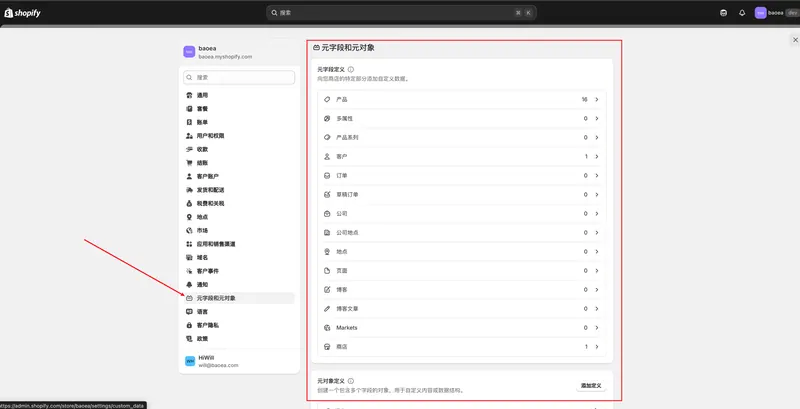
When every item in a category needs material and care details, shared metafield definitions make those values easier to maintain. The definition establishes the data type while each product supplies its own value.
The Files area centralizes product imagery and images used in articles. For a bulk import, upload the media first and put the corresponding address on the correct product row.
 跨境独立站开店