跨境独立站开店
Types and Examples of Navigation on E-commerce Sites: Designing User-Friendly Navigation
This article offers tips for designing intuitive and user-friendly navigation for your e-commerce store. Improve the user experience on your e-commerce site and reduce bounce rates.



What is navigation on an e-commerce site?
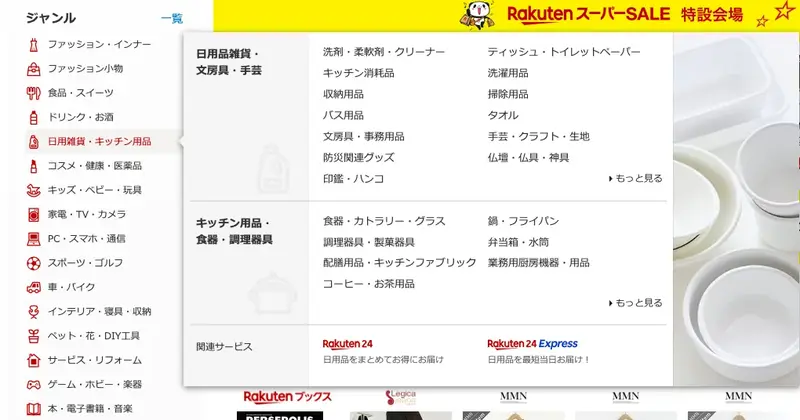
In e-commerce, navigation refers to features that allow users to smoothly browse products, categories, and various pages to reach their desired items. Menus, categories, and search functions are typical examples.
Benefits of installing navigation on an e-commerce site
Making products easier to find: By creating a clear category structure and intuitive menus, users can more easily find the products they are looking for, leading to a higher likelihood of purchase.
1. Header: Basic navigation common to all pages
The header is a navigation area that is displayed consistently throughout the entire site. By placing important information and functions in the header, users can easily access the information and products they need without getting lost. Since this is the first part that many users see and greatly influences the site's browsing rate and purchase rate, it should have a simple design, appropriate color scheme, and clear menu names.
2. Site search function: Makes it easier to find the product you're looking for.
The site search function allows users who know what product they want to find it using keywords. Especially on e-commerce sites with a large number of products, the search function impacts product discovery and purchase rates, so it needs to be placed in a location that is easy for users to find.