 跨境独立站开店
LinkedIn posting times and scheduling guide
This guide will show you the best times to post on LinkedIn and how to schedule posts. Use this guide to increase the reach and engagement of your LinkedIn posts.




This article will introduce the optimal time and method for scheduling LinkedIn posts.
According to Mr. Ishizaka, Head of Partner Business and Strategist at LinkedIn Japan, the number of LinkedIn users in Japan is projected to reach approximately 4 million by August 2025, and this number is increasing year by year.
LinkedIn, a business-focused social networking service, has become an important social media marketing strategy as one of the B2B multi-channels for promoting a company's value for free and finding partners and collaboration opportunities.
To reach a wider audience and gain engagement such as likes, saves, and comments on your posts, not only the quality of your content but also the timing of your posts is important.
This article provides a detailed explanation of the optimal posting times on LinkedIn, tips for increasing engagement, and how to schedule posts.
Optimal posting time on LinkedIn
- Tuesday to Thursday, 8:00 AM to 10:00 AM
- Tuesday to Thursday, 12:00-1:00 PM
1. Tuesday to Thursday, 8:00 AM to 10:00 AM
The best time to get responses on LinkedIn is Tuesday through Thursday, from 8 AM to 10 AM. Many people use their smartphones during their commute, and this is a time when their interest in business information is generally high.
In particular, research (in English) has shown that around 10:00 AM on Tuesdays and Wednesdays, when work has settled down, is a good time to check social media such as LinkedIn, as this increases the number of people checking the platform. This makes it a time when initial engagement (responses immediately after posting) can be obtained and content is more likely to spread.
2. Tuesday through Thursday, 12:00-1:00 PM
The lunch break between 12:00 and 1:00 PM on Tuesdays through Thursdays is the second most likely time for engagement. Many people check their feeds while eating lunch, so it tends to be a good time to get responses.
Optimal posting time for international audiences
When posting content targeting North America, the optimal time is considered to be 10-11 AM, when people gather information after arriving at work. Additionally, Tuesday through Thursday tend to see an increase in viewership for business-related posts.
Furthermore, because there is a 3-hour time difference between the east and west of North America, posting between 10 and 11 a.m. in the east coincides with the start of the workday or commuting time in the west, making it easier to reach users in both regions.
10-11 AM in Eastern North America is 12-1 AM the following day in Japan (11 PM-12 AM during daylight saving time).
In Europe, there is a custom of gathering information in the morning, so 9-10 a.m. is considered the time when engagement is most likely to be achieved. Also, on Thursday afternoons and evenings, networking awareness tends to increase, and information gathering becomes more active.
9-10 AM in Europe is approximately 5-7 PM in Japan (4-6 PM during daylight saving time). If your target country is clear, be sure to consider the time difference.
In Asia, the optimal times to post on LinkedIn are considered to be around lunchtime, from 11 am to 1 pm, and in the evening, from 5 pm to 6 pm. Posts tend to increase during lunchtime as people are browsing more frequently on their smartphones, and in the evening, people tend to check industry information while reflecting on their work.
Additionally, since it is frequently used in the early morning before commuting in India, 7-8 AM is a time when post engagement tends to be high.
11 AM to 1 PM in Asia is roughly 12 PM to 2 PM in Japan, but different countries use different time zones even at the same longitude, and there can be time differences in increments of 0.5 hours, so be sure to check the time difference with your target region using a world clock or similar tool.
Tips for increasing engagement on LikedIn posts
- Set the time according to the content.
- Leveraging LinkedIn's analytics features
- A/B test posting times
- Make use of the scheduled posting feature
It's also important to set the posting time according to the content you're posting.
For example, for B2B marketing posts, the most effective time would be between 8 and 10 a.m. on weekdays, when decision-makers and practitioners begin gathering information after arriving at the office.
For recruitment and job postings, Tuesday mornings are the best time to get engagement, as applicants tend to be more interested in applying.
Educational and learning-related posts are most effective on Wednesday mornings, when people are more likely to be motivated to learn, and on Friday afternoons, when people tend to save content in preparation for the weekend.
By continuously tracking the following analytical metrics, you can identify the times of day when post engagement is highest.
- Reactions: The number of times a user or company's official account has reacted to a post, such as by clicking "Like".
- Comments: Number of times users and official accounts have commented on a post
- Reposting: The number of times a user or official account shares a post on their own feed.
- Saves: The number of times a user has saved a post.
It's also effective to post the same content at different times of day and compare which version generates higher engagement through A/B testing.
By conducting continuous testing over several weeks to several months, you will be able to determine the optimal posting time.
Using the scheduled posting feature ensures that posts are published at peak times, preventing you from forgetting to post. It also allows you to post at the optimal time for your target audience overseas.
Scheduled Posting Guide
You can set the posting time for LikedIn in the following four steps:
- Open the posting screen
- Enter your post content
- Set a posting schedule
- Check the set schedule.
1. Open the posting screen.
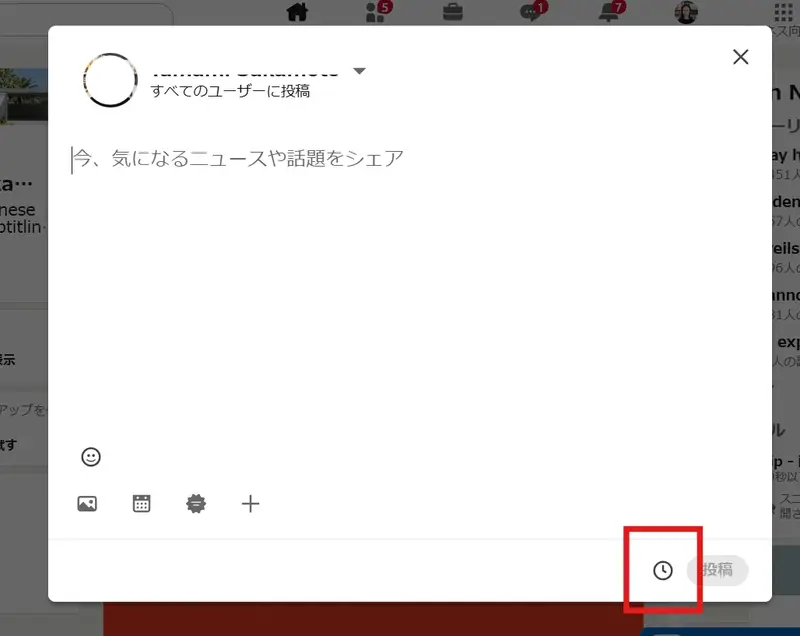
To set it up from a desktop, click "Start posting" at the top of the LinkedIn homepage to display the "Create a post" pop-up window. To set it up from a mobile device, tap "Posts" in the navigation bar to display the "Share a post" pop-up window.
2. Enter your post content.
Enter your post content in the "[What is the topic?]" field.
3. Set a posting schedule.
Click the clock icon in the bottom right corner, and in the "Schedule Post" pop-up window, select a date and time within 3 months from 10 minutes from the current time. You can select the posting time from a dropdown menu in 30-minute increments, or you can enter the time directly.
4. Check the set schedule.
Clicking [Next] will display the scheduled date and time above the post. Clicking [Schedule] will display a pop-up notifying you that the post has been scheduled.
Understanding the optimal posting times on LinkedIn is crucial for increasing engagement.
First, try posting during times that are generally considered to be highly effective. By repeatedly conducting A/B tests and continuously analyzing the results, you can identify the time slot that is most suitable for your target audience.
Furthermore, once you've identified the optimal timing, it's effective to utilize scheduling features to ensure you post at that specific time. By consistently implementing these strategies, you can steadily improve your posting performance.
Frequently Asked Questions about LinkedIn Posting Times
Why is the posting time important?
LinkedIn employs an algorithm that prioritizes generating highly relevant feeds, so posting during peak hours increases engagement, improves its algorithm ranking, and makes your posts visible to more users.
What days and times should I avoid posting?
- Monday: Busy with catching up on emails from the weekend and attending meetings at the start of the week, so I don't have time to check social media.
- Friday afternoon: More people are handing over tasks to the following week or leaving work early, so the priority of information input decreases.
- Weekend: Overall use of business social media declines, making it easier for important posts to get buried.
- Late at night: Few users.
What is the difference between a LinkedIn post and an article?
Posts are content shared with followers through a feed and have a character limit of 3,000 characters per post, while articles are viewable by users other than followers and can have up to 125,000 characters.
What is the optimal character count for a LinkedIn post?
The optimal character count for a LinkedIn post is considered to be between 1,200 and 1,800 characters.
Can I set the visibility of my LinkedIn posts?
- All Users: Visible to all users, both inside and outside the LinkedIn network.
- Connections only: Displays to the poster's primary connections.
- Group: Display to specific group members who shared the post.
Share this article
- Share on Facebook
- Share on X
- Share on LinkedIn



